Portable Bluetooth Speaker
Exploring the Product

Sound Bar Quick Guide

Top
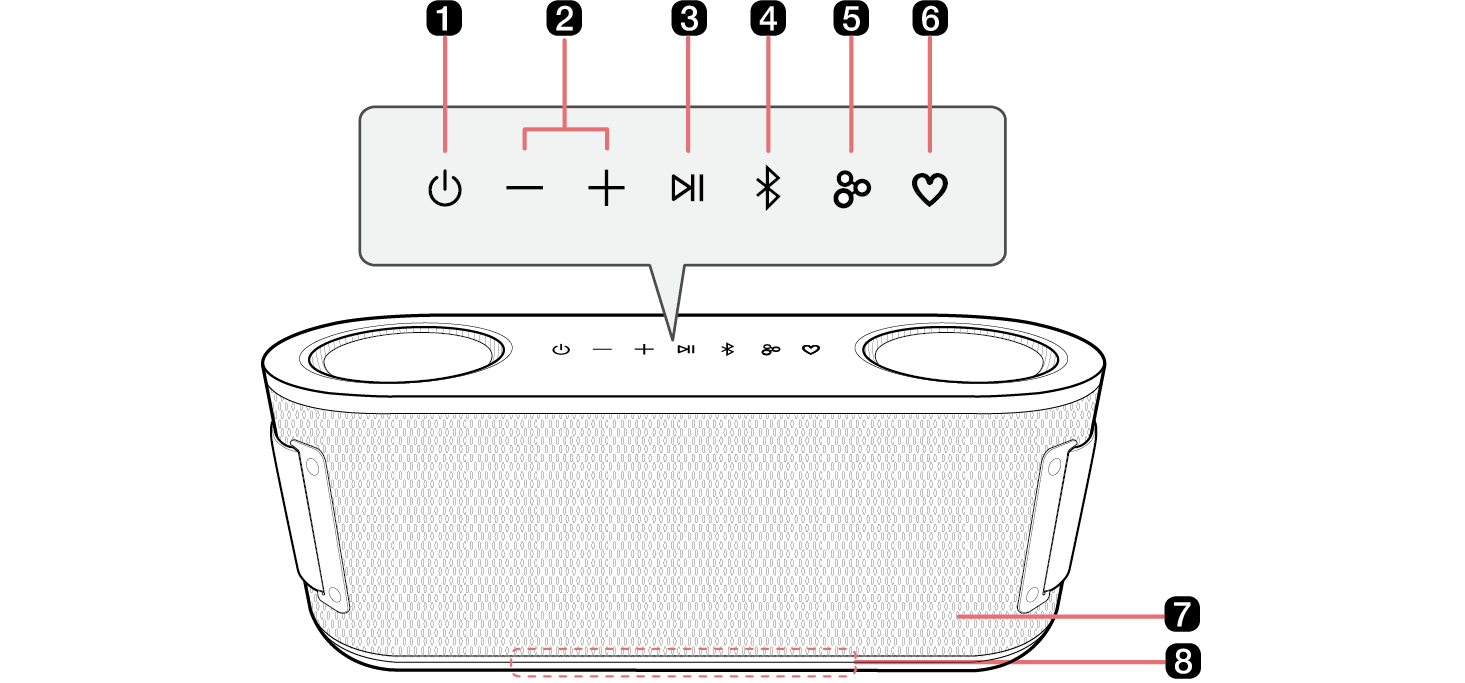
138094.png

a

Power 138129.png

Turns the speaker on or off.

b

Volume 138140.png138134.png

This adjusts the speaker volume.

c

Play/Pause 138195.png

While Bluetooth is connected, press the button to operate the Bluetooth device.

  • Play/Pause: Press the button.
  • Moving to the next music: Press the button twice quickly.
  • Moving to the previous music: Press the button three times quickly.
  • Using the Hands-Free function: Press the button in Bluetooth function when you receive a call from a device connected via Bluetooth. ([ See “Talking on the Phone Hands-free on page 19.)
  • Using the Voice command: Press and hold the button for 2 seconds. ([ See “Using Voice command on page 20.)

d

Bluetooth 138174.png

You can change the Bluetooth settings.

e

Party Link by Auracast™ 138221.png

Dual mode: Press the button twice quickly. ([ See “Dual mode on page 23.)

  • Only the same models can be connected.

Multi mode: Press the button. ([ See “Multi mode on page 24.)

  • Connectable models: BOUNCEC/GRABC/STAGE301

f

MY 138246.png

  • Press the button to use the MY functions. ([ See “Using MY function on page 22.) Before using MY functions, set up in the LG ThinQ app.
  • Press the button twice to use AI Calibration. Artificial intelligence selects the optimal sound settings to suit your content.
  • If the MY button setting in the LG ThinQ app is set to FYI.AI, it works as follows:
  • Press the button to launch the FYI.AI app.
  • Press and hold the button to input voice. Voice input is completed when the button is released.

g

Microphone

You can use the voice command and Hands-Free function while the speaker is connected to Bluetooth.

  • Do not cover the microphone part with the strap when the device is in operation.

h

Lighting Indicator

You can check the status of this speaker (battery charging level and battery status, Bluetooth connection status, speaker volume, Multi mode, Dual mode and selected EQ etc.)

  • To turn off the speaker's lighting, open the LG ThinQ App and navigate to the lighting bar to control the lighting settings.
  • Manual Control: Press the "Volume143935.png" button and the "MY143925.png" button simultaneously to toggle the lighting on or off.
  • Using the LG ThinQ App: Open the LG ThinQ App and navigate to the lighting bar to control the lighting settings.

138395.png

> CAUTION

Please note that when using the AI Calibration feature, the sound may suddenly become louder during the stage of optimizing sound quality.

142372.png

142367.png Note

Press and hold the Party Link by Auracast™142377.png button on one of the connected speakers for 2 seconds to cancel Dual mode or Multi mode.

