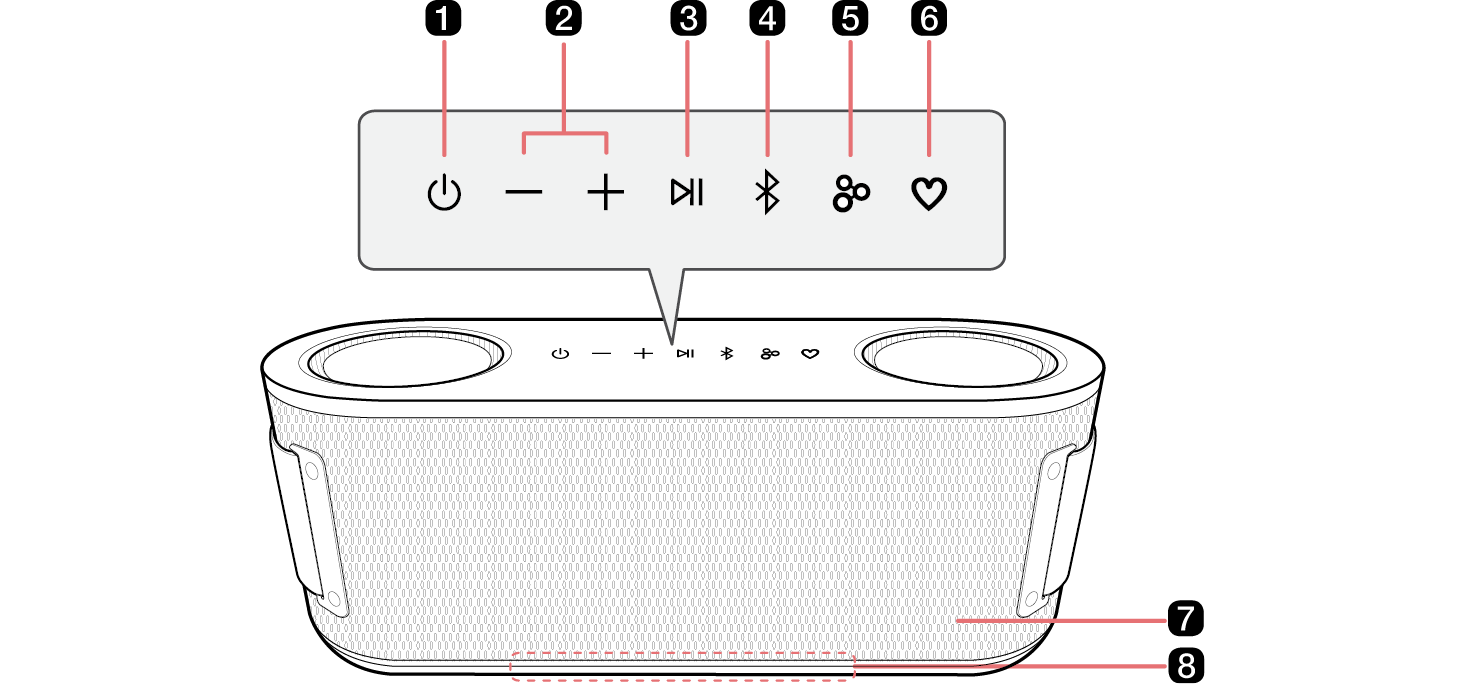
|
a
|
Power 
Turns the speaker on or off.
|
|
b
|
Volume  
This adjusts the speaker volume.
|
|
c
|
Play/Pause 
While Bluetooth is connected, press the button to operate the Bluetooth device.
- • Play/Pause: Press the button.
- • Moving to the next music: Press the button twice quickly.
- • Moving to the previous music: Press the button three times quickly.
- • Using the Hands-Free function: Press the button in Bluetooth function when you receive a call from a device connected via Bluetooth. ([ See “Talking on the Phone Hands-free” on page 18.)
- • Using the Voice command: Press and hold the button for 2 seconds. ([ See “Using Voice command” on page 19.)
|
|
d
|
Bluetooth 
You can change the Bluetooth settings.
|
|
e
|
Party Link 
- • Stereo mode: Press the button twice quickly. ([ See “Stereo mode” on page 22.)
- - Only the same models can be connected.
- • Multi mode: Press the button. ([ See “Multi mode” on page 23.)
- - Party Link is only available among Auracast™-supported models from LG.
|
|
f
|
MY 
- • Press the button to use the MY functions. ([ See “Using MY function” on page 21.) Before using MY functions, set up in the LG ThinQ app.
- • Press the button twice to use Space Calibration. It selects the optimal sound settings to suit your content.
- • If the MY button setting in the LG ThinQ app is set to FYI.AI, it works as follows:
- - Press the button to launch the FYI.AI app.
- - Press and hold the button to input voice. Voice input is completed when the button is released.
|
|
g
|
Microphone
You can use the voice command and Hands-Free function while the speaker is connected to Bluetooth.
- • Do not cover the microphone part with the strap when the device is in operation.
|
|
h
|
Lighting Indicator
You can check the status of this speaker (battery charging level and battery status, Bluetooth connection status, speaker volume, Multi mode, Stereo mode and selected EQ etc.)
- • To turn off the speaker's lighting, open the LG ThinQ App and navigate to the lighting bar to control the lighting settings.
- - Manual Control: Press the "Volume
 " button and the "MY " button and the "MY  " button simultaneously to toggle the lighting on or off. " button simultaneously to toggle the lighting on or off.
- - Using the LG ThinQ App: Open the LG ThinQ App and navigate to the lighting bar to control the lighting settings.
|