Charging the Battery - LG xboom Bounce
The speaker is a built-in battery. Make sure to charge the battery sufficiently before use.
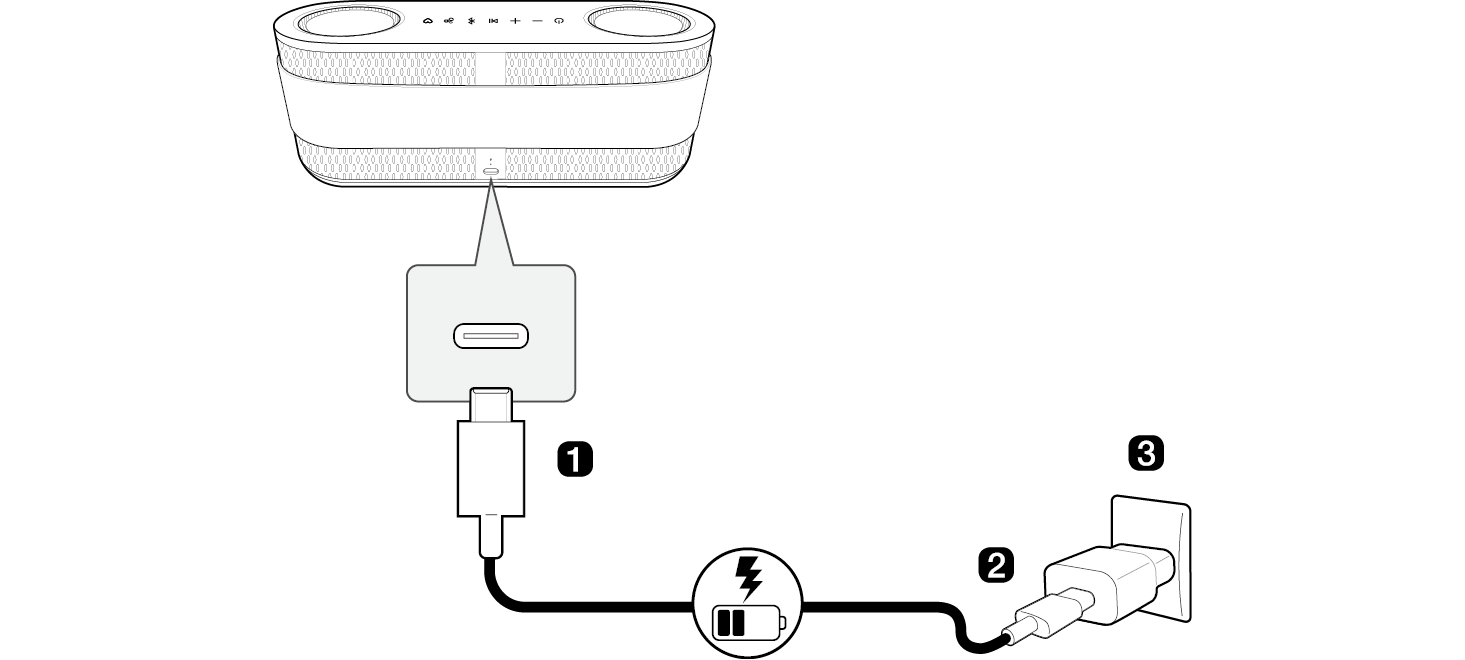
- a Connect the USB cable to DC IN port of the speaker.
- b Connect the supplied USB cable to the AC adapter (not supplied).
- c Plug the AC adapter into an AC outlet.

|

|
|
 Note Note
|
- • It takes about 3 hours to fully charge the speaker. The charging time may differ depending on the battery status or the speaker operation status.
- • Once the battery is fully charged, you can use the speaker for about 30 hours.
- - Operation time may vary depending on the battery or operation status.
|
|

|
|
> CAUTION
|
- • AC adapter is not supplied. It is recommended that you use the 5 V / 9 V AC PD adapter (more than 3 A) with this speaker. If you do not use the recommended adapter, charging time may differ.
- • Do not expose the speaker to liquids while charging or without disconnecting the cables. If exposed to liquid, do not charge the speaker until it is completely dry and clean.
- - Charging while wet may damage the speaker.
- • If exposed to chemicals and salt from a pool or ocean, dry and clean thoroughly.
- - Otherwise, it may cause a malfunction.
- • If the speaker cannot be charged due to foreign substances or moisture, the Lighting Indicator and Dot LED alternates between amber and blue with a emergency sound.
- • If there is a problem with the PD adapter, charging will stop, the Dot LED alternates between white and red, and the Lighting Indicator alternates between white and red for 3 seconds.
|