Connecting and Using the Speaker - LG xboom Power7000 High Power Speaker System
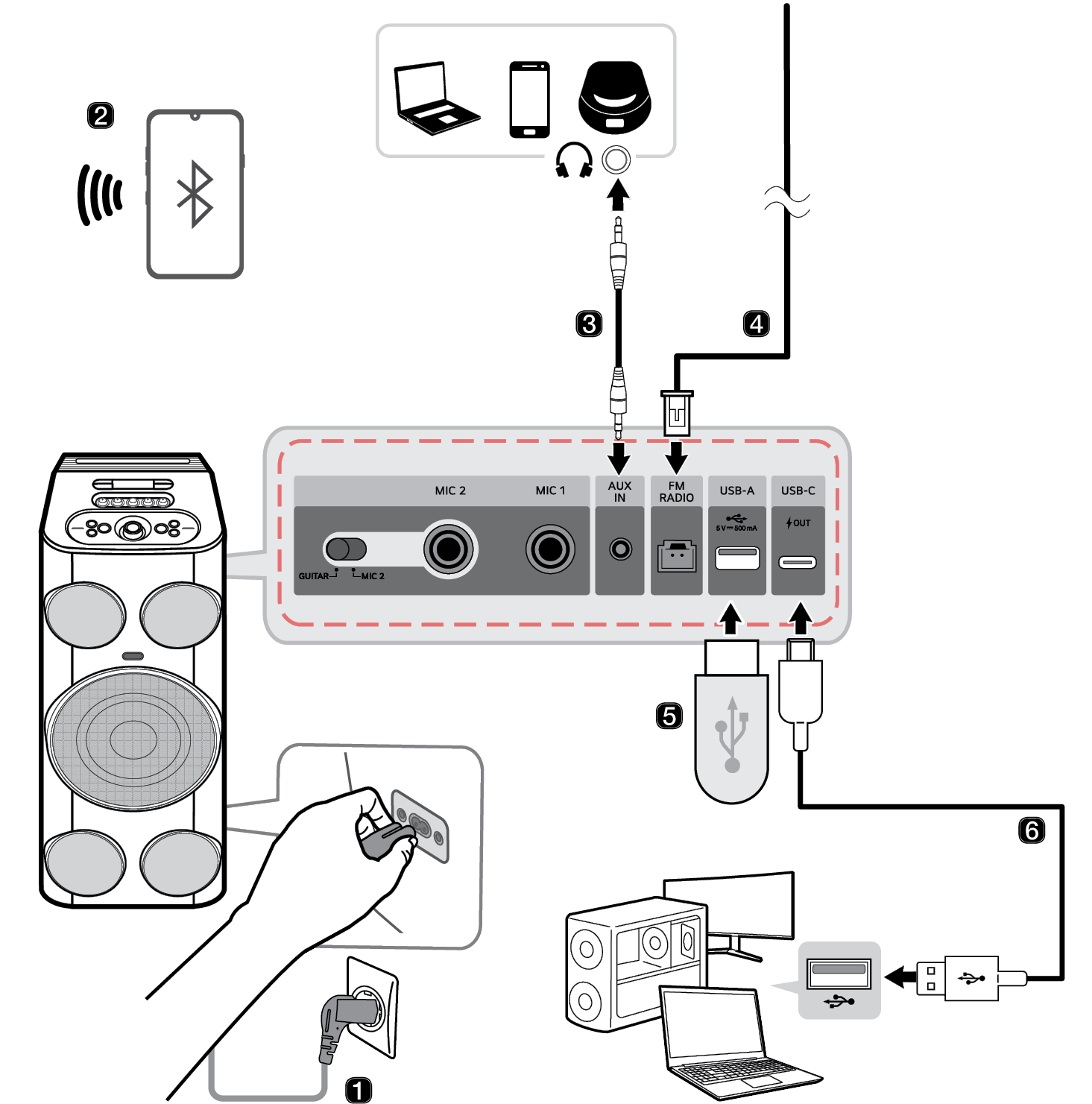

- a Connect the power cord to the power input on the back of the product.
- b Connecting the speaker to a smartphone via Bluetooth ([ See “Connecting Smartphone to the Speaker via Bluetooth” on page 18.)
- A Press the Power
 button on the speaker to turn it on. The lighting indicator blinks.
 - B Tap the Settings
 button on your smartphone and select Bluetooth. Turn on the Bluetooth function. (
 Off >
Off >  On)
On) - C Find “xboom Power7000” on the device list on the smartphone and connect to it. Once the smartphone is connected via Bluetooth, the lighting Indicator will turns on.
- D On the smartphone, play a music of your choice.
- c Connecting to an External Device ([ See “Connecting via 3.5 mm Stereo Cable” on page 38.)
- A Press the Power
 button to turn on the product.
 - B Connect the AUX IN terminal on the speaker to the external device via a 3.5 mm stereo cable.
- C Turn the external device on and start playing.
- d Connecting the supplied FM antenna ([ See “Connecting Antenna to the product” on page 12.)
- e Playing Music from the USB ([ See “Connecting the product to a USB storage device” on page 36.)
- A Press the Power
 button to turn on the product.
 - B Connect the USB storage device to the USB-A Type terminal on the speaker.
- f Connecting the product to a PC using a USB Cable ([ See “Connecting via USB Audio” on page 34.)
- A Connect the speaker to the PC via a USB Type-C cable.
- B Press the Power
 button on the speaker to turn it on.
 - C Press the Bluetooth
 button three times quickly on the speaker. When connected to a PC in USB Audio mode, the sound will appear.
 - D Select "xboom Power7000" as the PC audio output.
- E Play the audio on the PC.
- g Connecting the LG ThinQ App ([ See “Installing app” on page 31.)
- A Find the LG ThinQ app on the Google Play or App Store and install it on your smartphone.
- B Run the LG ThinQ app and use more functions. (EQ, Party Link, Lighting, Setting etc.)
Exploring the Product