Wireless Soundbar
Installing the Product with a LG TV

Sound Bar Quick Guide

Checking before installing with the TV

You can install this product with the LG TV

Please check the following first.

  • Available models as below
  • 55QNED : 55QNED80T** / 55QNED82T** / 55QNED85T** / 55QNED88T** / 55QNED80A** / 55QNED85A**
  • 65QNED : 65QNED80T** / 65QNED82T** / 65QNED85T** / 65QNED88T** / 65QNED90T** / 65QNED80A** / 65QNED85A**
  • 75QNED : 75QNED80T** / 75QNED82T** / 75QNED85T** / 75QNED88T** / 75QNED90T** / 75QNED80A** / 75QNED85A**
  • 86QNED : 86QNED80T** / 86QNED85T** / 86QNED80A** / 86QNED85A**
  • More than four persons needed.
  • When assembling, ensure that all of the provided screws are attached. If the screws are not fully tightened, the product may tilt or tip over, resulting in damage. Tightening the screws with excessive force may cause them to come off due to abrasion of the screw joint.
  • Please note the following when you mount the product to the wall. Product damage or injury may occur during the process.
  • Do not put objects on top of the wall-mounted product.
  • Secure the product firmly to the wall using the fixing screws so that it does not fall off.
  • Ensure it is out of the reach of children. Pulling or shaking the mounted product may cause it to fall.

157409.png

> Caution

  • Prevent children from hanging on the TV or climbing it.
  • Otherwise, the TV may fall over, causing injury or death.
  • Do not install the product in an unstable location, a location with vibration, or a location that does not support the product safely, such as on top of a shaky shelf or on a slope.
  • Otherwise, the product may fall or turn over, causing injury or product malfunction.
  • Put the product on a flat hard surface.
  • Otherwise, the product may fall over, causing injury.
  • Make sure that you do not damage the exterior of the product when moving or handling the product installed with a bracket.
  • If there is any dirt or fingerprint on the product exterior, only wipe the area with the dirt or fingerprint lightly.
  • Do not apply excessive force when removing the dirt. Excessive force may produce scratches or discoloration of the product exterior.
  • When assembling a bracket to the product, place the product on a table or a flat surface in a way that its screen faces downwards. When doing so, first place a soft cushiony cloth on the surface to prevent the screen from being damaged.
  • When assembling a bracket to the product, make sure that all screws are engaged to the end. (If not, the product may fall over after it was installed.) Do not tighten the screws with excessive force. Otherwise, the screws may become loose or fall out due to the wear and tear of the screwed parts.
  • Follow the instructions in this Installation manual to properly install the product.
  • If you do not follow the instructions in the Installation manual, the product may be installed incorrectly and cause serious injury or damage the product.
  • To install the product or adjust its height after installation, four or more people are needed.
  • If you try to handle the product alone, it may fall and cause injury or damage to the product.
  • Do not clean the product with wet towels or place heaters or humidifiers underneath it.
  • Moisture entering the product or steam and heat may result in fire, electric shock, or damage to the product.
  • Wear work gloves when installing the product and do not use your bare hands.
  • Otherwise, this may cause injury.
  • When installing the TV onto the wall, refer to the TV’s installation guide.
  • Check whether the wall is strong enough to hold the product before installation, and use the anchors and screws provided when installing.
  • If you use anchors or screws other than those specified by the manufacturer, they may not be able to hold the weight of the product, and this may cause safety hazards.
  • When drilling holes in your walls, make sure you use a drill and drill bit with the specified diameter. Make sure that you also follow the instructions regarding the depth of the holes.
  • Otherwise, the product may be installed incorrectly and cause safety hazards.
  • Keep the product away from sprinklers, detectors, high-tension wires, power sources, or places where vibrations or shock from impact are likely to occur.

Components for installing with the TV

Soundbar

157391.png

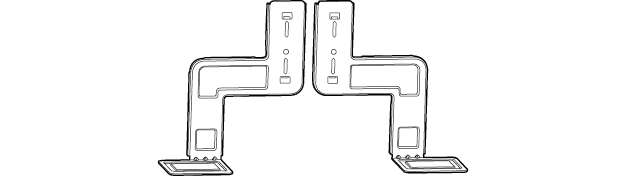
WOW Bracket

157382.png

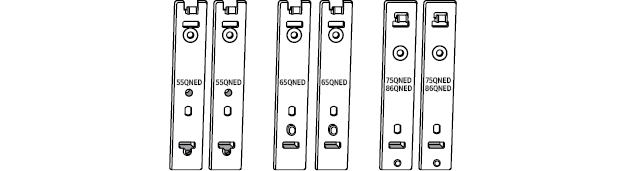
Holder

157374.png

Screws a

  • M4 x 16 mm

157357.png

Screws b

  • M4 x 12 mm

157347.png

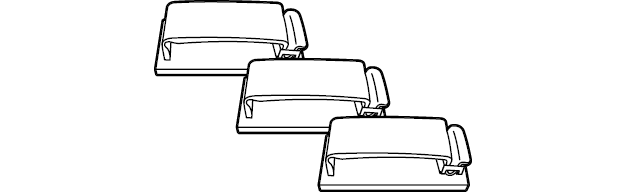
Cable holder

159174.png

157332.png

> Caution

  • Never re-use the screws from the TV. Use only the screws provided with the soundbar.