Portable Bluetooth Speaker
Exploring the Product

Sound Bar Quick Guide

Top
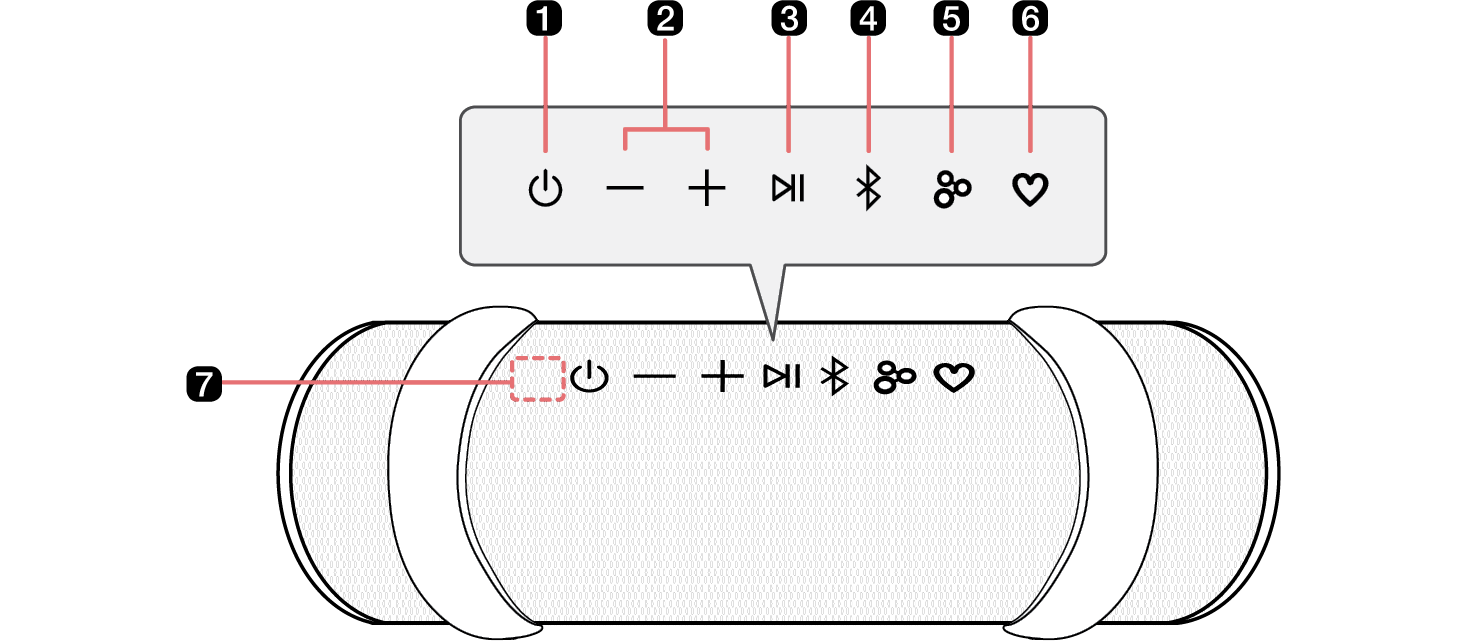
143938.png

a

Power 138129.png

Turns the speaker on or off.

b

Volume 138140.png138134.png

This adjusts the speaker volume.

c

Play/Pause 138195.png

While Bluetooth is connected, press the button to operate the Bluetooth device.

  • Play/Pause: Press the button.
  • Moving to the next music: Press the button twice quickly.
  • Moving to the previous music: Press the button three times quickly.
  • Using the Hands-Free function: Press the button in Bluetooth function when you receive a call from a device connected via Bluetooth. ([ See “Talking on the Phone Hands-free on page 18.)
  • Using the Voice command: Press and hold the button for 2 seconds. ([ See “Using Voice command on page 19.)

d

Bluetooth 138174.png

You can change the Bluetooth settings.

e

Party Link by Auracast™ 138221.png

Dual mode: Press the button twice quickly. ([ See “Dual mode on page 22.)

  • Only the same models can be connected.

Multi mode: Press the button. ([ See “Multi mode on page 23.)

  • Connectable models: BOUNCE/GRAB/STAGE301

f

MY 138246.png

  • Press the button to use the MY functions. ([ See “Using MY function on page 21.) Before using MY functions, set up in the LG ThinQ app.
  • Press the button twice to use AI Calibration. Artificial intelligence selects the optimal sound settings to suit your content.

g

Microphone

You can use the voice command and Hands-Free function while the speaker is connected to Bluetooth.

  • Do not cover the microphone part with the strap when the device is in operation.

138395.png

> CAUTION

Please note that when using the AI Calibration feature, the sound may suddenly become louder during the stage of optimizing sound quality.

142372.png

142367.png Note

  • Press and hold the Party Link by Auracast™142377.png button on one of the connected speakers for 2 seconds to cancel Dual mode or Multi mode.

