Sound Bar Quick Guide
Top
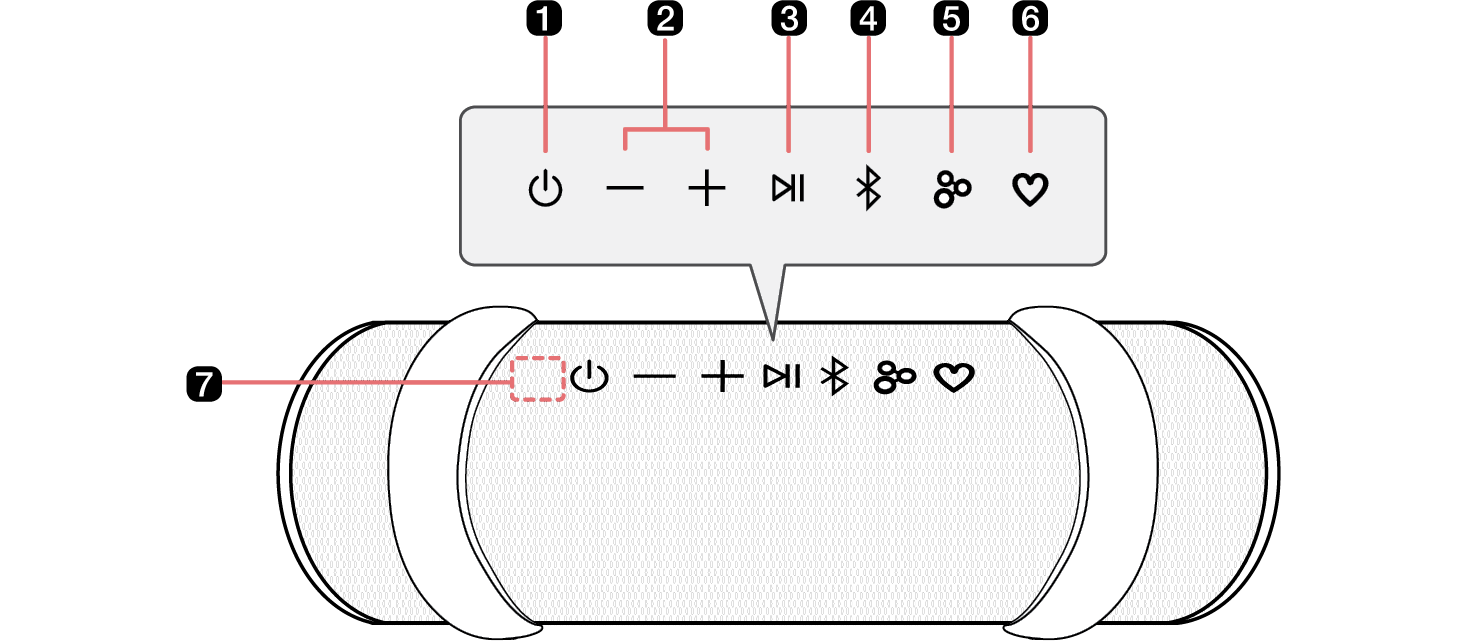
|
a |
Power Turns the speaker on or off. |
|
b |
Volume This adjusts the speaker volume. |
|
c |
Play/Pause While Bluetooth is connected, press the button to operate the Bluetooth device.
|
|
d |
Bluetooth
You can change the Bluetooth settings.
|
|
e |
Party Link by Auracast™ Dual mode: Press the button twice quickly. ([ See “Dual mode” on page 22.)
Multi mode: Press the button. ([ See “Multi mode” on page 23.)
|
|
f |
MY
|
|
g |
Microphone You can use the voice command and Hands-Free function while the speaker is connected to Bluetooth.
|


|
|
|
> CAUTION |
|
Please note that when using the AI Calibration feature, the sound may suddenly become louder during the stage of optimizing sound quality. |

|
|
|
|
|
Press and hold the Party Link by Auracast™ |


