Connecting TV with an HDMI Cable
You can transmit TV audio to the product by connecting the TV to the product with an HDMI cable. Add a variety of 3D effects to the original audio to fill the room with a deep, rich sound.
Watching TV after connecting with an HDMI cable
- a Using the HDMI cable, connect the HDMI™ d TV (eARC / ARC) terminal on the back of the product to the HDMI IN (ARC) terminal on the TV as shown in the picture.
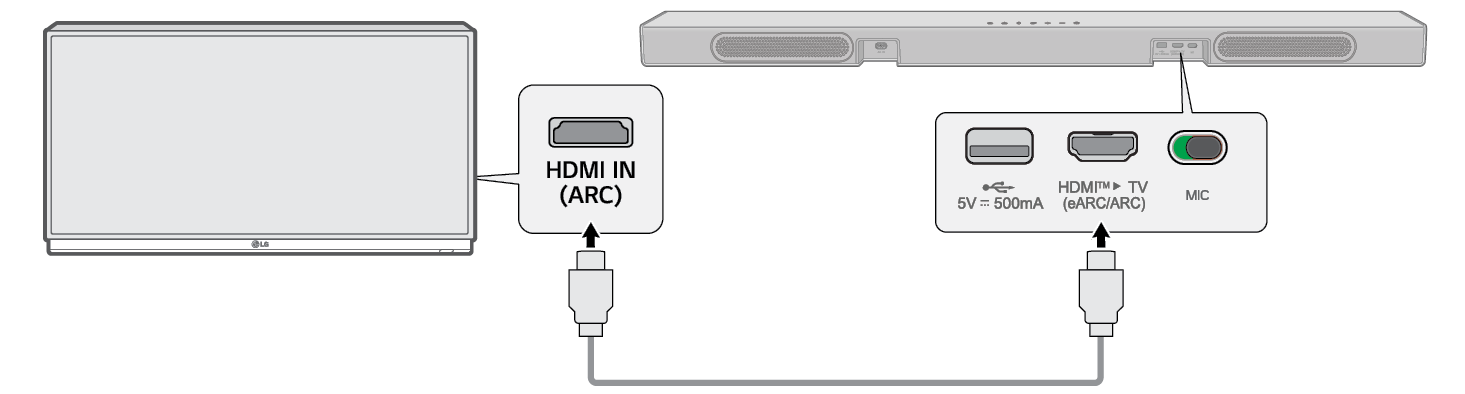

- b Press the Source
 button repeatedly until [HDMI ARC] appears on the display window.


- c Enter the [Speaker] settings in the TV’s menu and set the output to [HDMI ARC]. Settings and menu items may vary depending on the TV manufacturer.
|
|
|
|
|


SIMPLINK
- • SIMPLINK refers to the HDMI-CEC function that allows you to use a single TV remote control to easily operate an audio device or player connected to an LG TV via HDMI.
- - Functions controllable with a SIMPLINK-compatible LG TV remote control: Power on/off, volume control, mute on/off, etc.
- • For more information on how to set up SIMPLINK, consult your LG TV’s user manual.

|
|
|
|
|


Using WOW Orchestra with LG TV
The combination of the LG soundbar and the LG TV gives you the best listening experience to output sound simultaneously through both of them.
This function is automatically activated when the soundbar is connected to the TV and you can choose it on the sound out menu on the TV.
|
|
|
|
|


Using PSW mode with WOW Orchestra
PSW (Personalized Sound Wizard) mode is a personalized sound mode provided by LG TV and can be enjoyed in the WOW Orchestra function.
With the personalized sound mode provided by LG TV, the user-selected sound source is analyzed with artificial intelligence deep learning technology to set it as the preferred optimal sound.
The [PERSONALIZED SOUND] appears on the display window when PSW mode has set.
|
|
|
|
|
Refer to the TV’s instruction manual for more details on settings. |

