Using Ambient lighting - LG Sound Suite AI M7 / M5 Wi-Fi SPEAKER
Ambient lighting creates a more immersive atmosphere.
Using Ambient lighting on the Product
You can press the Volume  and MY
  buttons on the product at the same time to turn the ambient lighting on or off. The color and brightness of the ambient lighting can be adjusted through the LG ThinQ app. Refer to the following information. ([ See “Using Ambient lighting in the LG ThinQ app”)


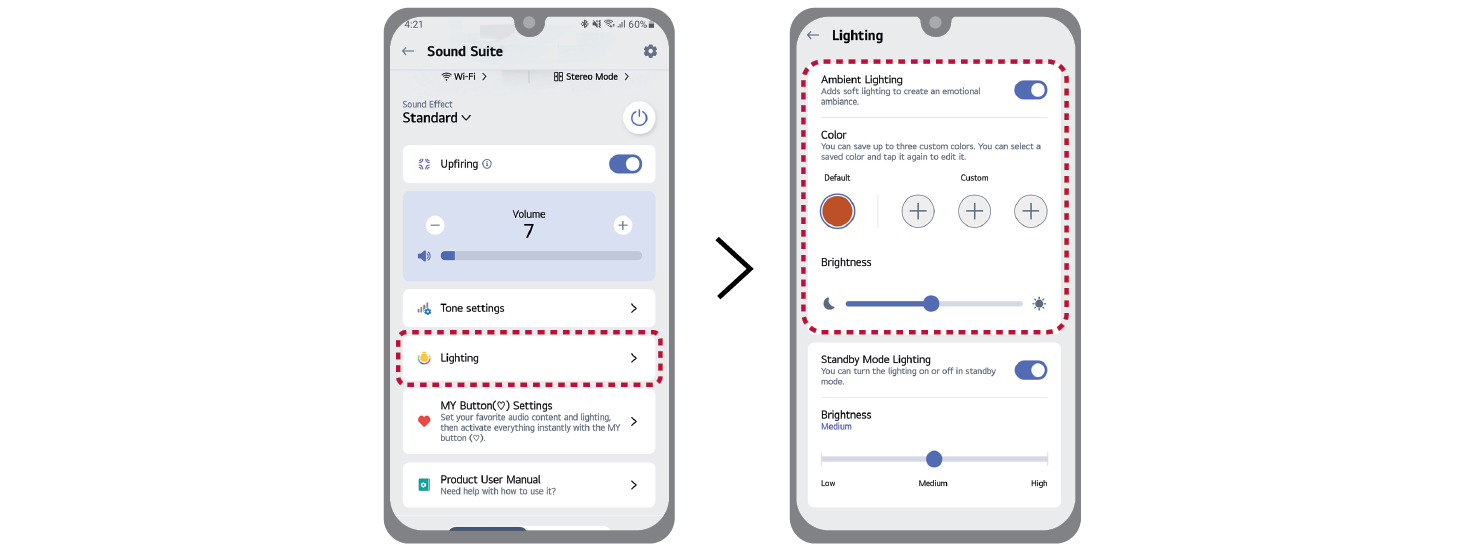
Using Ambient lighting in the LG ThinQ app
You can turn the ambient lighting on or off using the LG ThinQ app. After turning on ambient lighting, set the desired color and brightness.

|

|
|
 Note Note
|
- • The ambient lighting feature is available in all functions, regardless of music playback.
- • When the LG Sound Suite Speaker or Subwoofer is connected to the LG Sound Suite Soundbar via Dolby Atmos FlexConnect and Group Lighting is enabled in the soundbar's lighting settings, the connected product's Ambient Lighting synchronizes with the soundbar's Ambient Lighting.
- • The lighting indicator takes precedence over the ambient lighting.
- • Do not look directly at the light-emitting part when the ambient lighting feature is turned on.
- • If the illumination brightness is glaring, switch on the room lights or turn off the ambient lighting feature of the product.
|