Sound Bar Quick Guide
Installing and using the Product
- a Connect the soundbar to your TV via an optical cable or an HDMI cable.
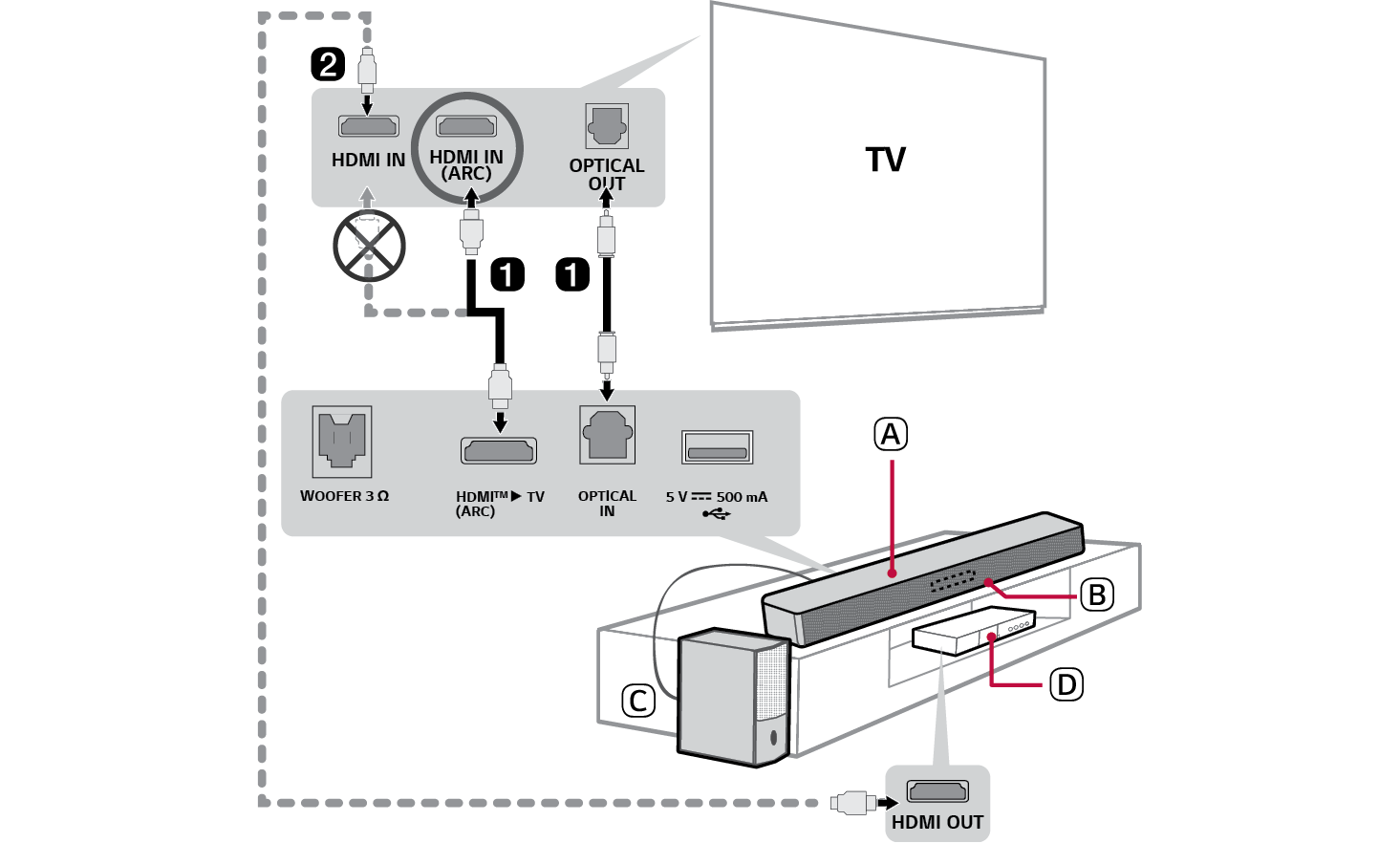

- A Soundbar
- B Remote Control Receiver / Status Display
- C Subwoofer
- D External Device - (Blu-ray player, game console, etc.)
- b If you are using an external device (ex. Set-top box, Blu-ray player, game console, etc.), connect it to the TV via an HDMI cable.
- c Connect in the following order: subwoofer [ soundbar. Then, turn on the soundbar. ([ See “Connecting the Product” on page 6.)
- d Using the product with your TV ([ See “Connecting with an Optical Cable”, “Connecting via Bluetooth”, “Connecting with an HDMI Cable” on page 20, 22, 23.)
-
A Press the Function
 button repeatedly until “OPT/HDMI ARC” appears on the status display.
 - B On your TV’s settings, set the output speaker to [HDMI ARC], [Optical] or [External Speaker].
- C When the TV is properly connected to the product, “OPT” or “ARC” will appear on the status display with a sound.
- e Connecting the product to your smartphone via Bluetooth ([ See “Connecting via Bluetooth” on page 28.)
-
A Tap the Settings
 button on your smartphone and select Bluetooth. Turn on the Bluetooth function. (
 Off >
Off >  On)
On) -
B Press the Bluetooth pair
 button. After a moment, you will see “BT READY” on the status display.
 - C Find and select “LG SH5A(XX)”.
- D When the product is connected to your smartphone via Bluetooth, you can see the status display change from “PAIRED” [ “Connected Bluetooth device name” [ “BT”.
- f Connecting to the LG ThinQ app ([ See “Connecting with the product via LG ThinQ app” on page 33.)
- A Install the LG ThinQ app on Google Play or the App Store.
- B Run the LG ThinQ app and follow the instructions.
- C The product will connect to your smartphone and you can control the product with LG ThinQ app.
Table of Contents
Soundbar Quick Guide
2 Installing and using the Product
Installation
5 Installing the soundbar
6 Connecting the Product
7 Setting up surround sound
Exploring the Product
11 Front
12 Back
13 Exploring Remote Control
Connecting to the TV
20 Connecting with an Optical Cable
22 Connecting via Bluetooth
23 Connecting with an HDMI Cable
Connecting to an External Device
25 Connecting with an HDMI Cable
27 Connecting with an Optical Cable
Using the Product as an Audio System
28 Connecting via Bluetooth
31 Connecting to a USB Storage Device
33 Connecting with the product via LG ThinQ app
33 Installing the LG ThinQ app and registering the product
Safety Precautions
35 Safety and Regulatory
38 Prevention of product misuse
Before Reporting Product Malfunction
42 Troubleshooting
Appendix
45 Specifications
47 Registered Trademarks and Licenses
48 Open Source Software Notice Information
49 Handling the Product
Installation