Portable Bluetooth Speaker
Exploring the Product

Sound Bar Quick Guide

Top & Front
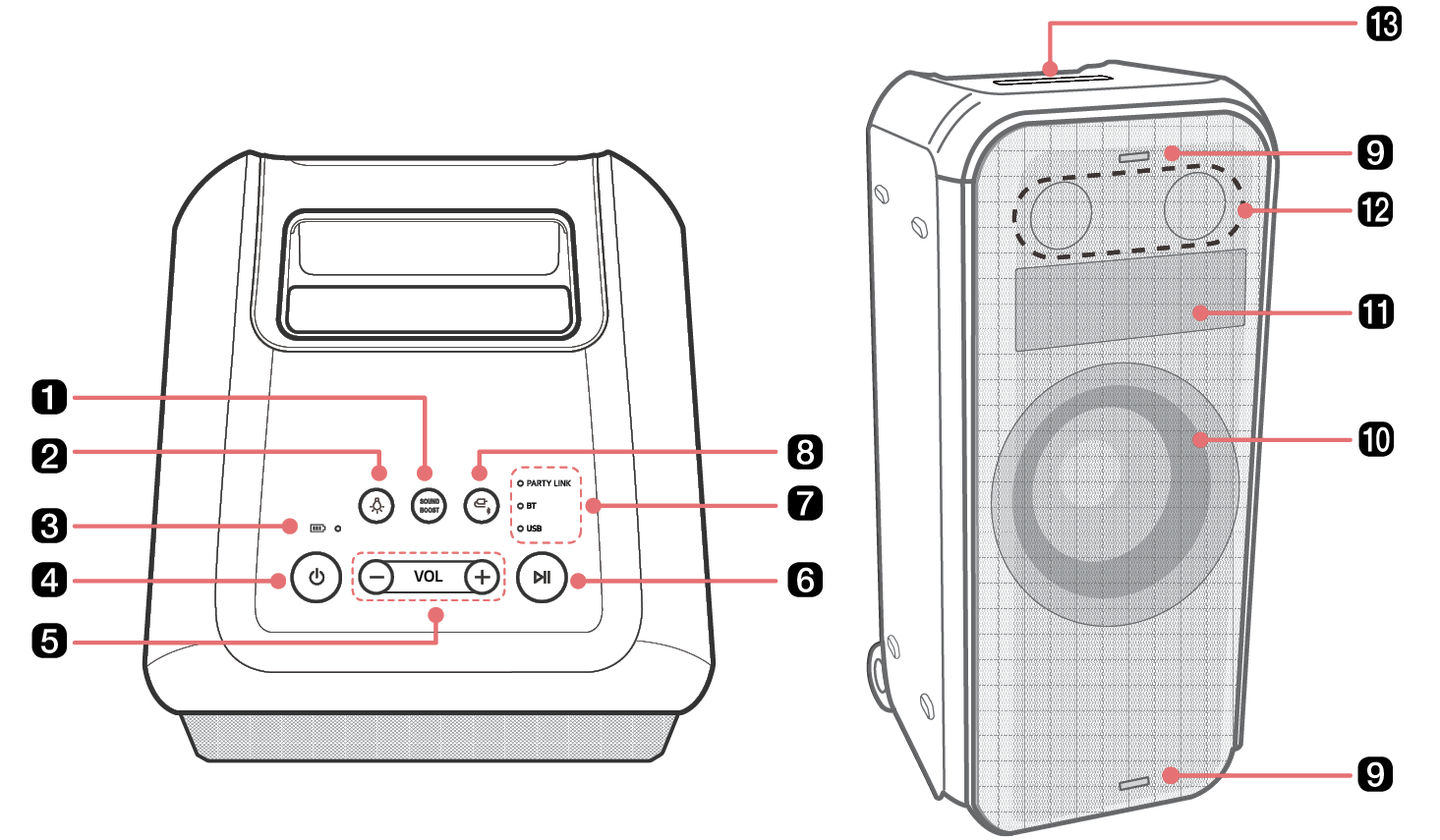
21905.png

a

SOUND BOOST

Changes sound effect. ([ See “Setting Sound Effects on page 25.)

b

Lighting 21914.png

Press the button to select the desired Woofer Lighting.

  • You can customize the Woofer Lighting mode as you want by connecting to the LG XBOOM app.
  • If you press and hold the Lighting25610.png button for 2 seconds with product, turn the Woofer Lighting, Flash lighting and Dot Animation off.

c

Battery LED

Please check the battery charging level and battery status. ([ See “Checking Battery Status on page 11.)

d

Power 21942.png

It turns on/off the product.

  • If you press and hold the Power21932.png button for 2 seconds with product turned on, you can see the battery status on the battery LED.

e

Volume 21960.png21952.png

It controls the volume level.

f

Play/Pause 21972.png

Press the button to operate the product.

  • Play/Pause: Press the button.
  • Moving to the next music: Press the button twice quickly.
  • Moving to the previous music: Press the button three times quickly.

g

Function LED

Indicates the input mode or Bluetooth connection status.

h

Function 26004.png

Press the button repeatedly to select the desired input mode or function.

i

Flash Lighting

Enjoy a flash light to the beat of the music.

j

Speaker (Woofer) / Woofer Lighting

Enjoy a powerful Bass sound and colorful light show to the beat of the music.

k

Dot Animation

Display interesting movements or sentences using the LG XBOOM app.

  • You can customize the Dot Animation as you want by connecting to the LG XBOOM app.
  • If you press Lighting25617.png button and Volume23622.png23616.png button simultaneously, you can change the Dot Animation.

Dot Animation display support language

  • Support language : English, Spanish, French, Italian, German, Russian, Portuguese, Swedish, Ukraine
  • To use a supported language, you must set the keyboard language in the mobile phone settings.
  • If it is difficult to set the keyboard language, please check the mobile manual or contact the manufacturer.

l

Speaker (Tweeter)

Tweeter plays accurate and clean high notes.

m

Handle

Use it when carrying the product.

7729.png

> CAUTION

  • Place the product at a safe distance from the child’s reach. Otherwise it may result in the product falling down and causing personal injury and/or property damage.
  • Be careful that the speaker does not fall down. Otherwise it may result in the speaker malfunctioning and causing personal injury and/ or property damage.
  • Warning - Flashing lights may trigger seizures or other health problems in people with photosensitivity issues, and they should consult their physician before using these features. Individuals who experience symptoms such as seizures, dizziness, confusion, unusual vision problems, or disorientation should immediately stop using the product and seek medical attention if the symptoms persist.
