Sound Bar Quick Guide
Top
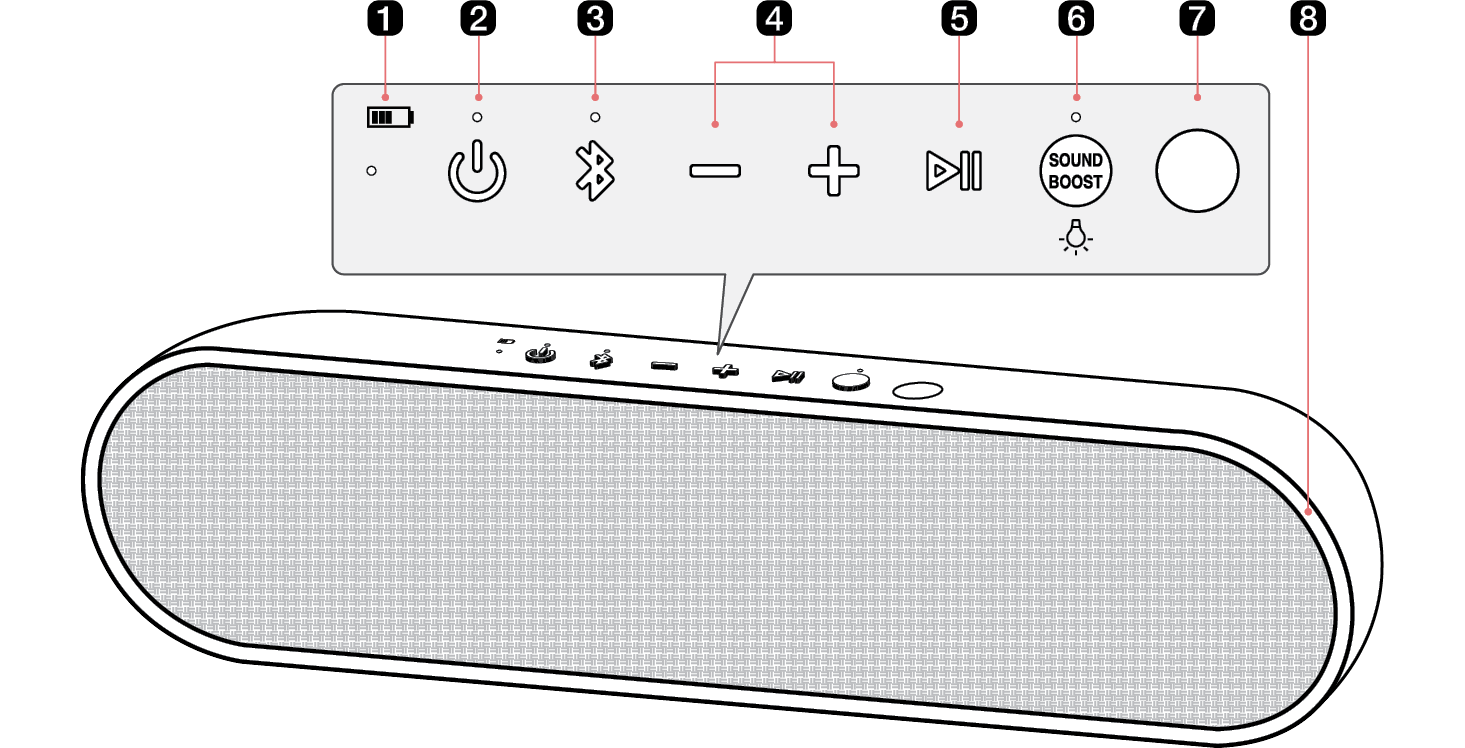
|
a |
Battery LED Please check the battery charging level and battery status. ([ See “Checking Battery Status” on page 16.)
|
|
b |
Power Turns the speaker on or off. Power LED Indicates the power status. |
|
c |
Bluetooth
You can change the Bluetooth settings.
Bluetooth LED Indicates the Bluetooth connection status.
|
|
d |
Volume This adjusts the speaker volume. |
|
e |
Play/Pause While Bluetooth is connected, press the button to operate the Bluetooth device.
|
|
f |
SOUND BOOST Changes sound effect. ([ See “Setting Sound Effects” on page 26) SOUND BOOST LED You can check the selected sound effect. Lighting Press and hold the button to turn on or off the lighting. |
|
g |
IR transmitter This is used when connecting the TV and the speaker automatically. Place the speaker with the IR transmitter facing the TV. If the IR transmitter is covered, the connection may not be smooth. |
|
h |
Lighting LED You can change the effect of Lighting and turn it on or off in the LG XBOOM app. |


