Sound Bar Quick Guide
Connecting and Using the Speaker
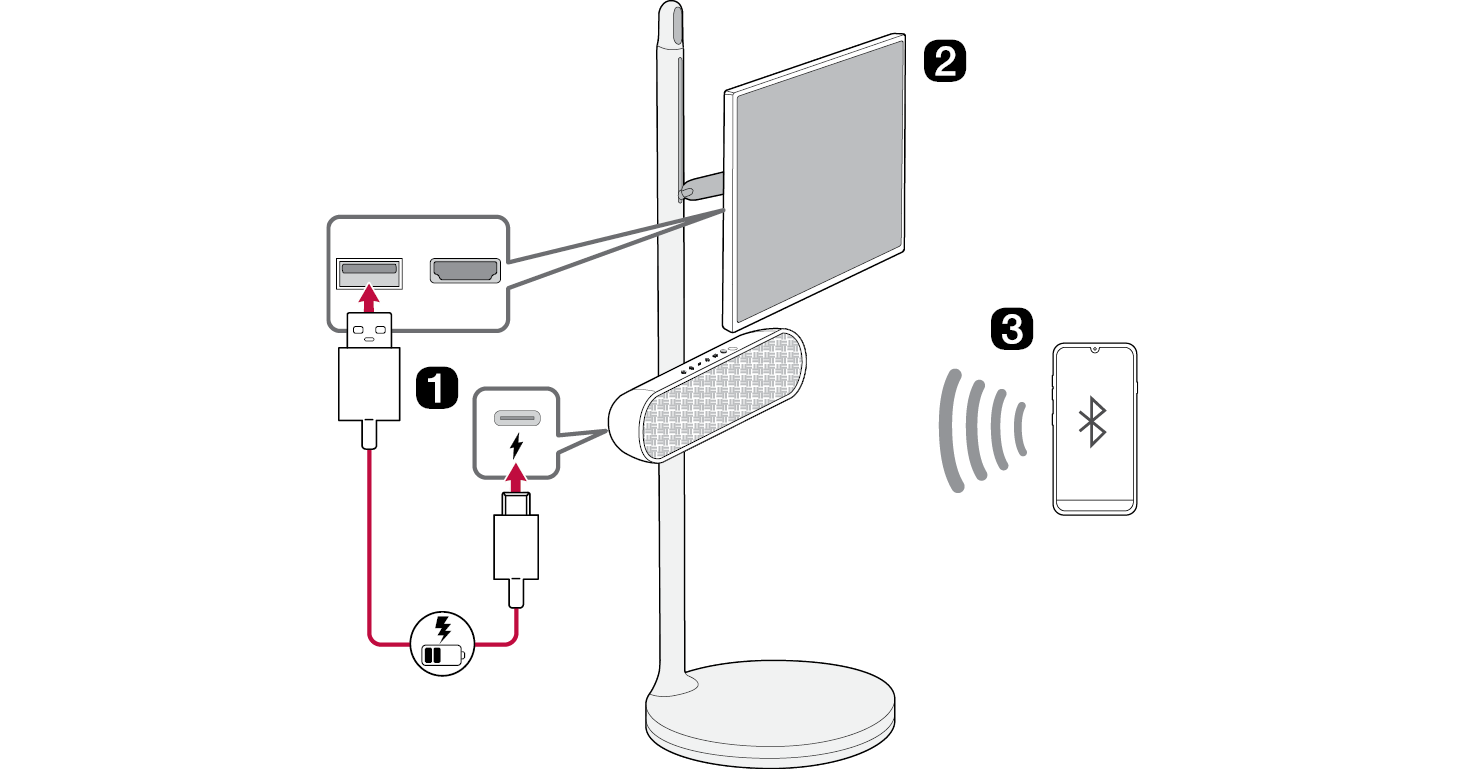

- a Charge the speaker before using it by opening the rear cover and connect the speaker to the USB port on the StanbyME TV by the USB cable.
 The speaker can be charged while the TV is on.
 If the speaker is connected to the TV and powered by the battery, the usage time of the TV may be shortened. For continuous use, connect the power to the TV.
 When connecting the speaker to the TV, position the TV monitor horizontally.
 You can charge the speaker without the TV by using your own AC adapter for charging.
- b Connect the speaker to the StanbyME TV via Bluetooth ([ See “Connecting the TV to the Speaker via Bluetooth” on page 17.)
- Connect automatically (Initial connection)
- A Turn on the TV.
-
B Press the Power
 button on the speaker to turn it on.
 - C The TV finds and connects to this speaker so you can hear the TV sound.
- Connect manually
-
A Press the Power
 button on the speaker to turn it on. Bluetooth LED blinks. If the LED is not blinking press Bluetooth
 button.
 -
B Press ;[
 (Sound Out) on the StanbyME TV and select [Bluetooth device] or [Bluetooth device+Internal speaker] and then [Device list].
- If you choose [Bluetooth device], find and select “LG-XT7S(XX)” on the Connectable Devices list.
- If you choose [Bluetooth device+Internal speaker], select [Connect One Speaker]. Then find and select “LG-XT7S(XX)” on the Connectable Devices list.
- C Once the TV is connected via Bluetooth, the Bluetooth LED will turn on and you can hear the TV sound through the speaker.
- c Connect the speaker to a smartphone via Bluetooth ([ See “Connecting Smartphone to the Speaker via Bluetooth” on page 19.)
-
A Turn off the StanbyME TV. Press the Power
 button on the speaker to turn it on. Bluetooth LED blinks. If the LED is not blinking press Bluetooth
 button.
 -
B Tap the Settings
 button on the smartphone and select Bluetooth. Turn on the Bluetooth function. (Off
 > On
> On )
) - C Find “LG-XT7S (XX)” on the device list on the smartphone and connect to it. Once the smartphone is connected via Bluetooth, the Bluetooth LED will turn on.
- D On the smartphone, play a music of your choice.
- d Connecting the LG XBOOM App ([ See “Installing app” on page 24.)
- A Find the LG XBOOM app on the Google Play or App Store and install it on your smartphone.
- B Run the LG XBOOM app and use more features. (EQ, Lighting, Sleep Timer, Setting etc.)
Table of Contents
Portable Bluetooth Speaker Quick Guide
2 Connecting and Using the Speaker
Installation
5 Checking before installing with the TV
7 Affixing the Speaker to the TV
Exploring the Product
11 Top
13 Back
Charge
14 Charging the Battery
16 Checking Battery Status
Connecting to Bluetooth
17 Connecting the TV to the Speaker via Bluetooth
19 Connecting Smartphone to the Speaker via Bluetooth
22 Connecting Two Bluetooth Devices to the Speaker
Connecting to the LG XBOOM App
24 Installing app
Additional Functions
26 Setting Sound Effects
27 Using WOW Orchestra with LG StanbyME TV
27 Resetting the Speaker
28 Resetting Bluetooth
28 Using Auto Power Management
29 Using Auto power - on.
29 Voice feedback function
Safety Precautions
30 Safety and Regulatory
33 Prevention of product misuse
Before Reporting Product Malfunction
37 Troubleshooting
Appendix
39 Specifications
40 Registered Trademarks and Licenses
41 Handling the Product
Installation