Product

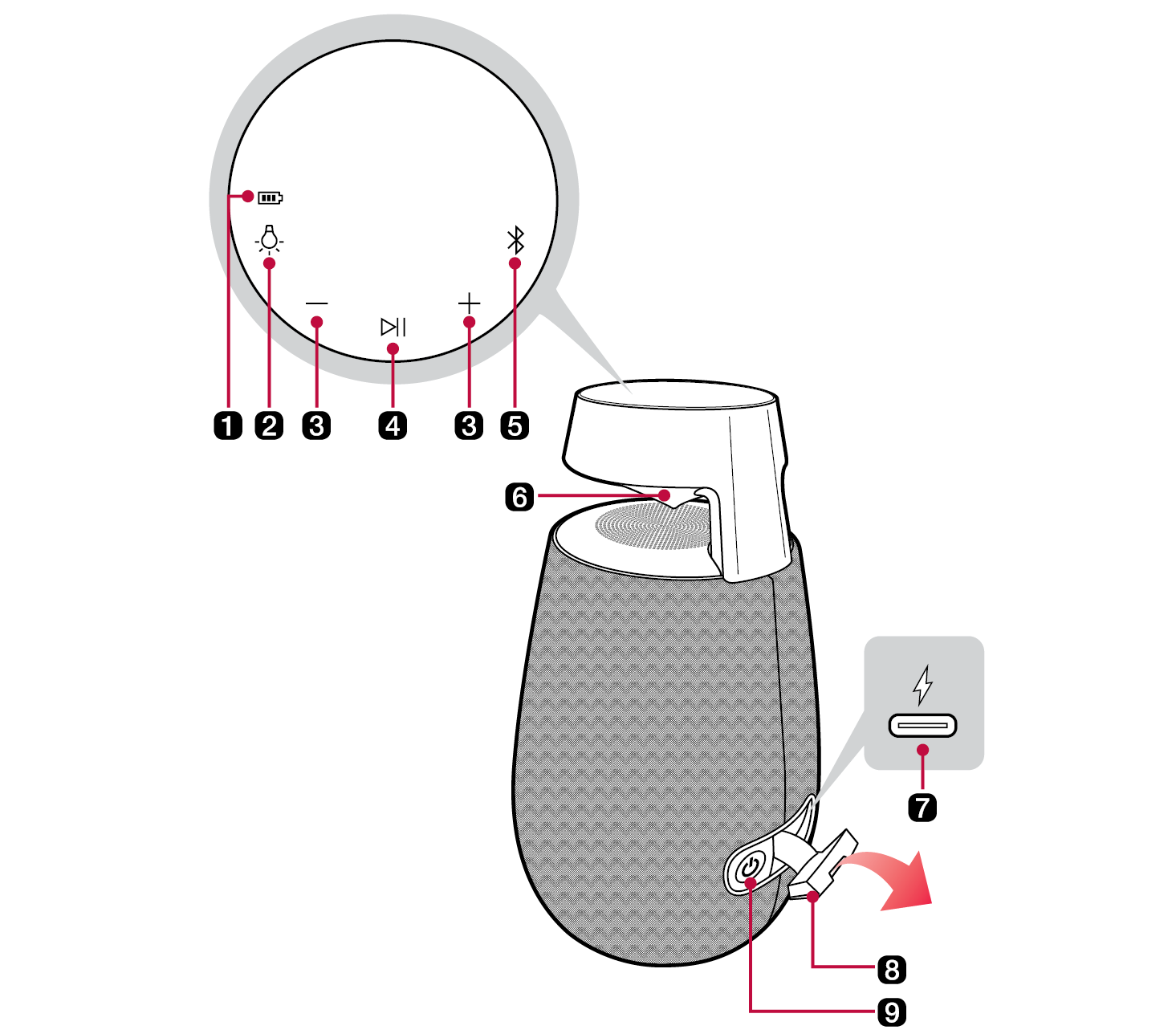
Top and Back

7551.png

a

Battery LED

Please check the battery charging level and battery status. ([ See “Checking Battery Status on page 9.)

b

Lighting 11343.png

Press the button to select the desired lighting.

  • Lighting: Ambient / Nature / Party / Off

One Touch mode

Press the button for about 2 seconds to start the One Touch mode. ([ See “Using the One Touch mode on page 21.)

c

Volume 21758.png 21749.png

It controls the volume level.

d

Play/Pause 21737.png

Press the button to operate the product.

  • Play/Pause: Press the button.
  • Moving to the next music: Press the button twice quickly.
  • Moving to the previous music: Press the button three times quickly.

e

Bluetooth 21725.png

You can change the Bluetooth settings.

Bluetooth LED

Indicates the Bluetooth connection status.

  • 24228.png Blinks in white: Ready for Bluetooth device connection.
  • 24237.png Turns on in white: Connected to a Bluetooth device.

f

Lighting LED

Using the LG XBOOM app, you can fine-tune the lighting effects to your liking.

g

21684.png (DC IN)

Plug in the provided USB (Type C to A) cable to charge the speaker battery.

h

Back Cover

Make sure to fully close the back cover after use.

  • Ingress Protection: IP55 (Speaker tested under controlled laboratory conditions with an IP55 rating.)
  • - Solid: Protected against dust
  • - Liquid: Protected against low pressure jets of water from all directions. Tested in fresh water. Dry before using. Do not charge while wet.

i

Power 21677.png

It turns on/off the product.

  • If you press and hold the Power 21671.png button for 2 seconds with product turned on, you can see the battery status on the battery LED.

7729.png

. CAUTION

  • Place the product at a safe distance from the child’s reach. Otherwise it may result in the product falling down and causing personal injury and/or property damage.
  • Be careful that the speaker does not fall down. Otherwise it may result in the speaker malfunctioning and causing personal injury and/ or property damage.
  • Be careful not to expose the product to sunlight for a long time to prevent discolouration.
  • Be careful not to drop the speaker. Mechanical shock may cause deterioration of water-resistant and dust-resistant performance.
  • It is not good for the eyes to see the lens while the LED is running, do not see it directly.

22196.png

22190.png Note

  • The button LEDs are usually off. To use the speaker, tap the buttons area on the top panel to activate the buttons. Then tap the button you want.

Charge

