Sound Bar Quick Guide
Connecting and Using the Speaker
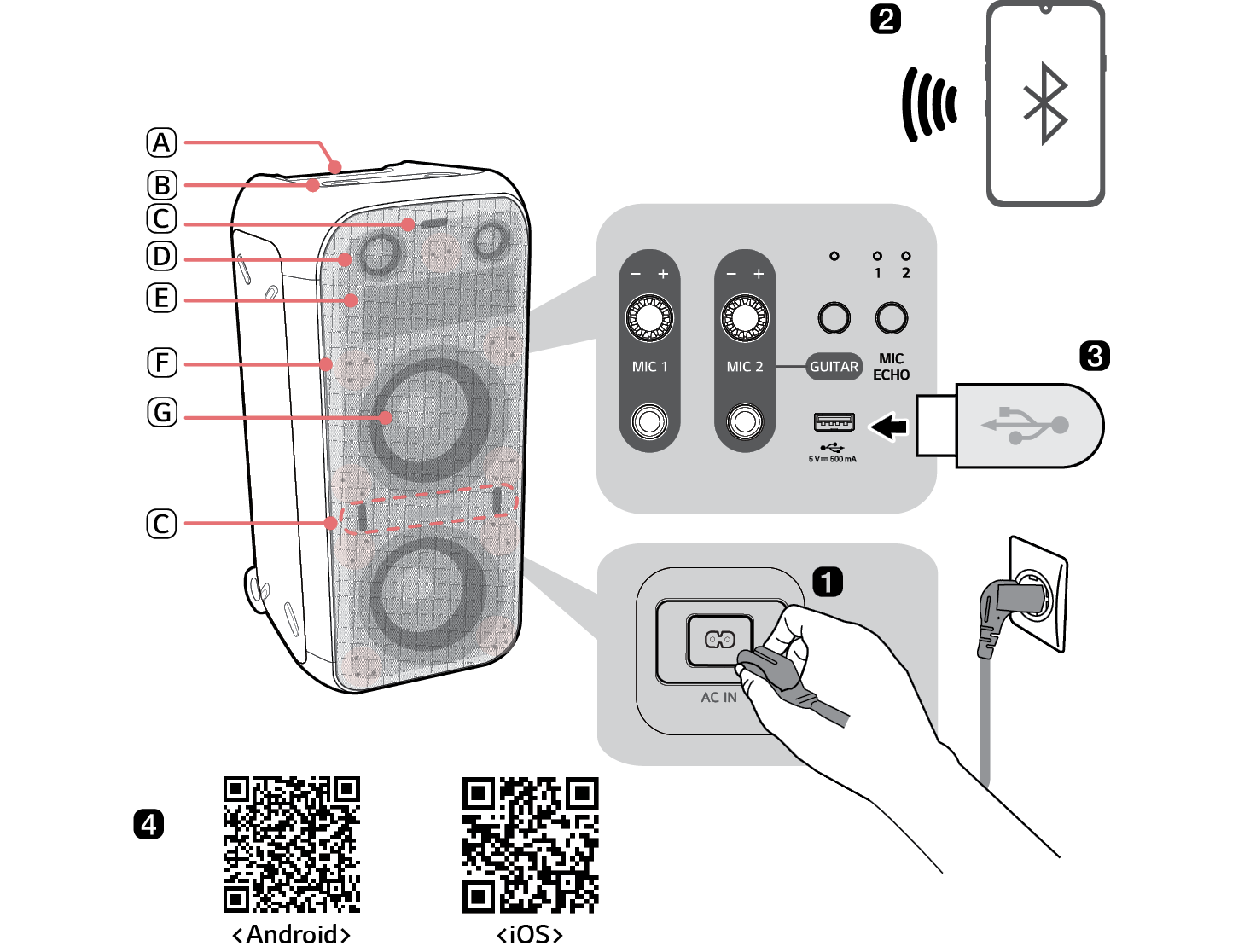

- A Handle
- B Controls
- C Flash Lighting
- D Speaker (Tweeter)
- E Pixel Art Display
- F Sparkle Lighting
- G Speaker (Woofer) / Multi Color Ring Lighting
- a Connect the power cord to the product by opening the rear cover
- b Connecting the speaker to a smartphone via Bluetooth ([ See “Connecting Smartphone to the Speaker via Bluetooth” on page 12.)
-
A Press the Power
 button to turn on the product.
 -
B Press the Function
 button on the product repeatedly to select the BT function. The BT LED blinks.
 -
C Tap the Settings
 button on your smartphone and select Bluetooth. Turn on the Bluetooth function. (
 Off >
Off >  On)
On) - D From the list of smartphone devices, find and tap on “LG-XL9T(XX).”
- E Once the smartphone is connected to the product via Bluetooth, the BT LED will turn on. Play a desired track in the music app on your smartphone.
- c Playing Music from the USB ([ See “Connecting the product to a USB storage device” on page 23.)
- A Open the back cover of the product and plug the USB storage device into the USB terminal.
-
B Press the Power
 button to turn on the product.
 -
C Press the Function
 button on the product repeatedly to select the USB function. The USB LED will turn on.
 -
D Press the Play/Pause
 button to enjoy the music.
 - d Connecting to the LG XBOOM App ([ See “Installing app” on page 17.)
- A Find the LG XBOOM app on the Google Play or App Store and install it on your smartphone.
- B Run the LG XBOOM app and use its functions. (EQ, Wireless Party Link, Pixel Art Display, Lighting, Setting etc.)
- e Power Saving ([ See “Power Saving Mode” on page 26.)
If there is no playback or button input for 15 minutes, the product turns off automatically. On the LG XBOOM app, you can enable or disable [Auto Power Management].
Table of Contents
Portable Bluetooth Speaker Quick Guide
2 Connecting and Using the Speaker
Exploring the Product
5 Top & Front
7 Back
9 How to place the speaker
Installation
11 Connecting the Product
Connecting to Bluetooth
12 Connecting Smartphone to the Speaker via Bluetooth
15 Connecting with two smartphones
Connecting to the LG XBOOM App
17 Installing app
19 Using the Wireless Party Link
Connecting to USB
23 Connecting the product to a USB storage device
Additional Functions
25 Setting Sound Effects
26 Initializing the Software
26 Power Saving Mode
27 Using Auto power - on.
27 Voice feedback function
Safety Precautions
28 Safety and Regulatory
31 Prevention of product misuse
Things to Check before Reporting Malfunction
35 Troubleshooting
Appendix
36 Product Specifications
37 Registered Trademarks and Licenses
38 Handling the Product
Exploring the Product