|
a
|
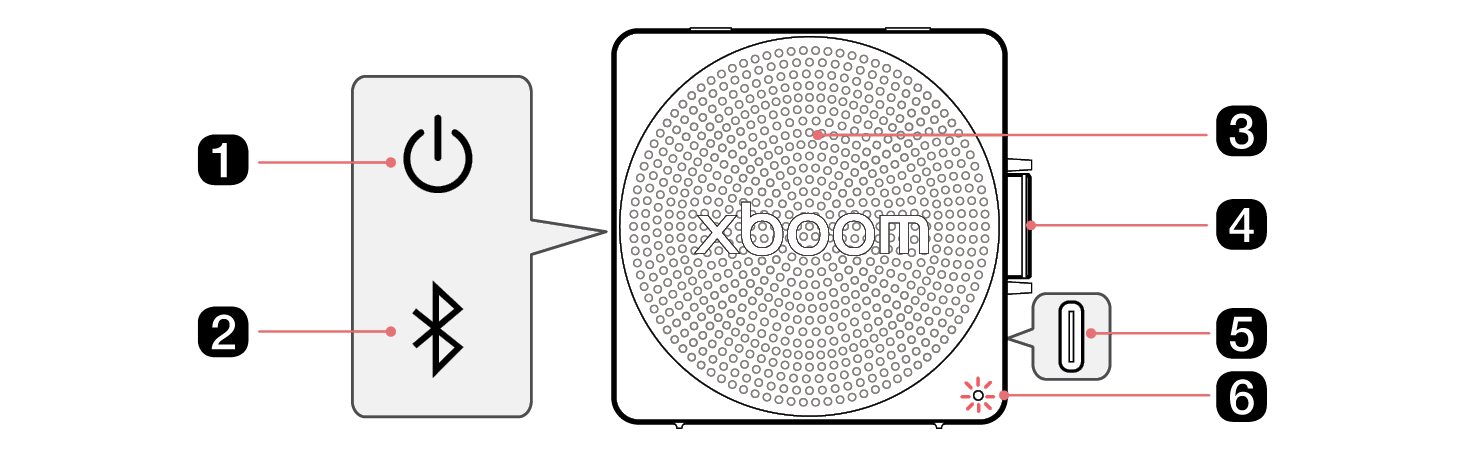
Power 
Turns the speaker on or off.
|
|
b
|
Bluetooth 
|
|
c
|
Microphone
You can use the voice command and Hands-Free function while the speaker is connected to Bluetooth.
|
|
d
|
Play/Pause 
- • While Bluetooth is connected, press the button to operate the Bluetooth device.
- - Play/Pause: Press the button.
- - Moving to the next music: Press the button twice quickly.
- - Moving to the previous music: Press the button three times quickly.
- - Using the Hands-Free function: Press the button when you receive a call from a device connected via Bluetooth. ([ See “Talking on the Phone Hands-free” on page 21.)
- - Using the Voice command: Press and hold the button for 2 seconds. ([ See “Using Voice command” on page 22.)
- • Adjust the volume level by turning the knob either upward (+) or downward (-).
|
|
e
|
DC IN/USB Audio Port
- • Plug in a USB (Type-C) cable to charge the speaker battery.
- • Plug in a USB (Type-C) audio cable to connect the speaker to your PC and play music through it.
|
|
f
|
LED
You can check the status of this speaker.
- • Indicates the Bluetooth connection status.
- -
 : Blinks in blue / Ready for Bluetooth device connection. : Blinks in blue / Ready for Bluetooth device connection.
- -
 : Turns on in white / Connected to a Bluetooth device. : Turns on in white / Connected to a Bluetooth device.
- • Indicates the MY connection status.
- -
 : Turns on in purple for 3 seconds / Switched to MY function : Turns on in purple for 3 seconds / Switched to MY function
- • Indicates the USB Audio connection status.
- -
 : Turns on in yellow for 3 seconds / This speaker is connected to a PC in USB Audio mode. : Turns on in yellow for 3 seconds / This speaker is connected to a PC in USB Audio mode.
- • You can check the status when connecting in Multi Mode or Stereo Mode. ([ See “Using the Party Link” on page 26.)
- • Please check the battery charging level and battery status. ([ See “Checking Battery Status” on page 11.)
- - Press and hold the Power
 button for 2 seconds to check the battery level while the power or the speaker is on. button for 2 seconds to check the battery level while the power or the speaker is on.
|