Sound Bar Quick Guide
Connecting via Bluetooth
Bluetooth is a technology that wirelessly connects electronic products around you.
Connect the product to a TV via Bluetooth and enjoy your TV audio in high quality.
Watching TV after connecting it wirelessly
-
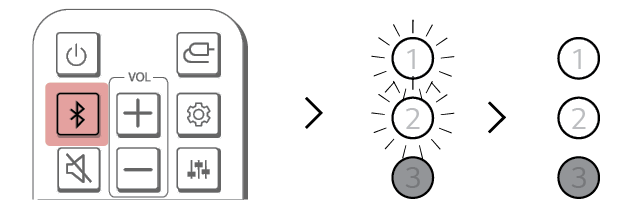
a Press the Bluetooth pair
 button. After a moment, LED1 and LED2 blink white.
 - b Press the Settings button on the TV remote control and enter the [Speaker] menu to set the output speaker to [Bluetooth].
- c Find and select “LG S20A(XX)”.
- d When the product is connected to the TV via Bluetooth, LED1 and LED2 light up white.