Installing and using the Product
- a Connect the soundbar to your TV via an optical cable or an HDMI cable.
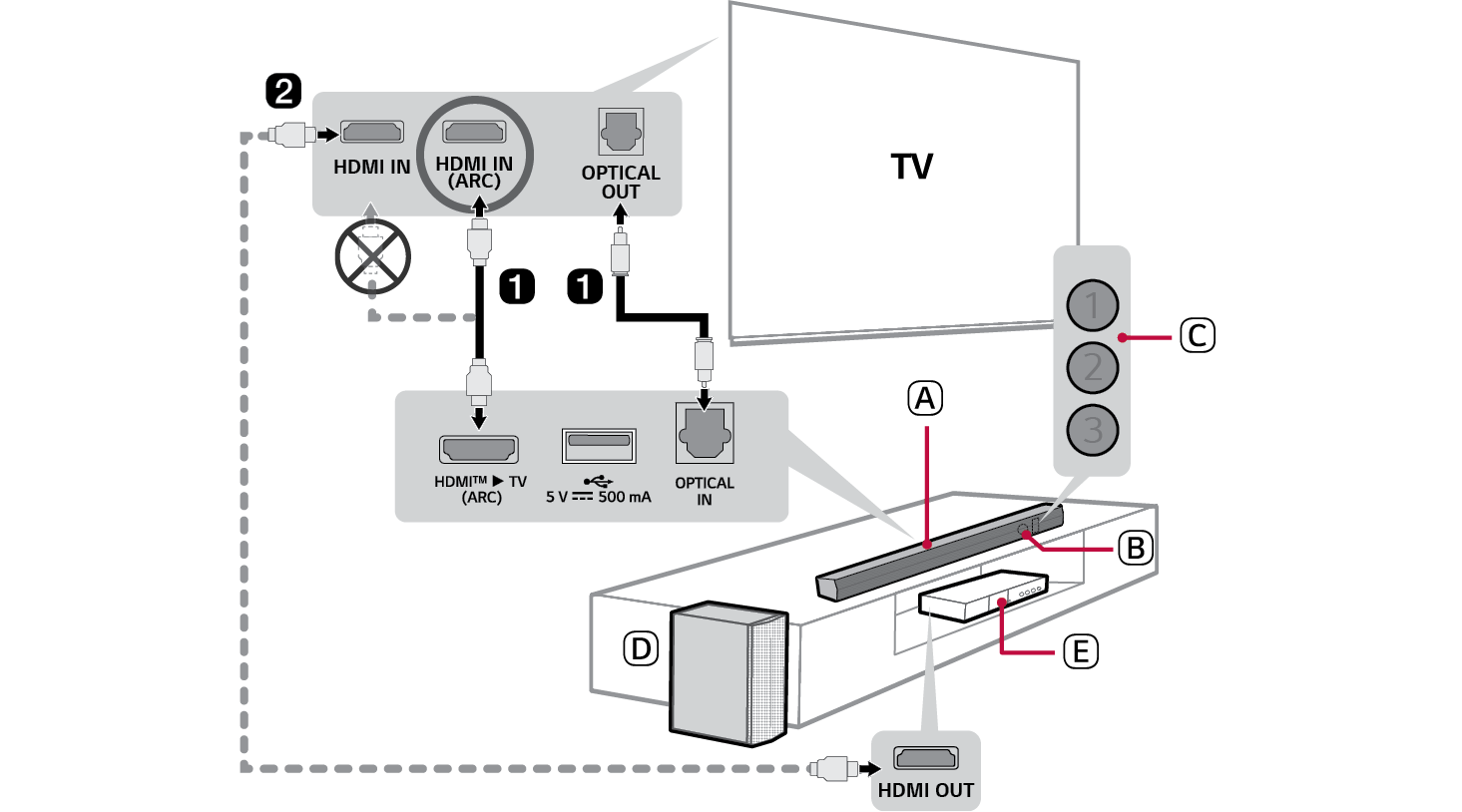

- A Soundbar
- B Remote Control Receiver
- C Status LED (ABC)
- D Wireless Subwoofer - Install it close to the soundbar.
- E External Device - (Blu-ray player, game console, etc.)
- b If you are using an external device (ex. Set-top box, Blu-ray player, game console, etc.), connect it to the TV via an HDMI cable.
- c Connect to power in the following order: wireless subwoofer [ soundbar. Then, turn on the soundbar. When the connection is automatically established with the soundbar, the LED on the wireless subwoofer will light up green. ([ See “Connecting the Product” on page 6.)
- d Connecting the product to your smartphone via Bluetooth ([ See “Connecting via Bluetooth” on page 34.)
- A Tap the Settings
 button on your smartphone and select Bluetooth. Turn on the Bluetooth function. (
 Off >
Off >  On)
On) - B Press the Bluetooth pair
 button. After a moment, LED1 and LED2 blink white.
 - C Find and select the product on your smartphone. The product appears as “LG S60T(XX)”.
- D When the product is connected to your smartphone via Bluetooth, LED1 and LED2 light up white.
- e Connecting to the LG ThinQ app ([ See “Connecting with the product via LG ThinQ app” on page 37.)
- A Find and install the LG ThinQ app on Google Play or App Store from your smartphone.
- B You can get more information regarding its use by selecting [Help] in [Setting].
Manually connecting the soundbar to the wireless subwoofer ([ See “Connecting the wireless subwoofer manually” on page 8.)
If you see a red LED on the wireless subwoofer, it means that the soundbar is not connected to the subwoofer. If this is the case, connect them in the following order.
- A Press the Power
 button on the soundbar to turn it off.
 - B Press the PAIRING button on the back of the wireless subwoofer. Check if LED blinks green.
- - If you still see a red LED on the wireless subwoofer, press and hold the button on the back of the subwoofer again.
- C Press the Power
 button on the soundbar to turn it on.
 - D When the connection is established, you will see a green LED light on the wireless subwoofer light up.
Installation