Sound Bar Quick Guide
Connecting the Product
You can enjoy a richer sound by connecting the soundbar to the wireless subwoofer.
Connecting the wireless subwoofer automatically
After completing installation, the wireless subwoofer will automatically be connected to the soundbar. Connect the soundbar to the subwoofer in the following order.
- a Plug the power cable into the wireless subwoofer.
- b Plug the power cable connected to the wireless subwoofer into an outlet.
- c Plug the power cable into the soundbar.
- d Plug the power cable connected to the soundbar into an outlet.
-
e Press the Power
 button on the soundbar to turn it on.

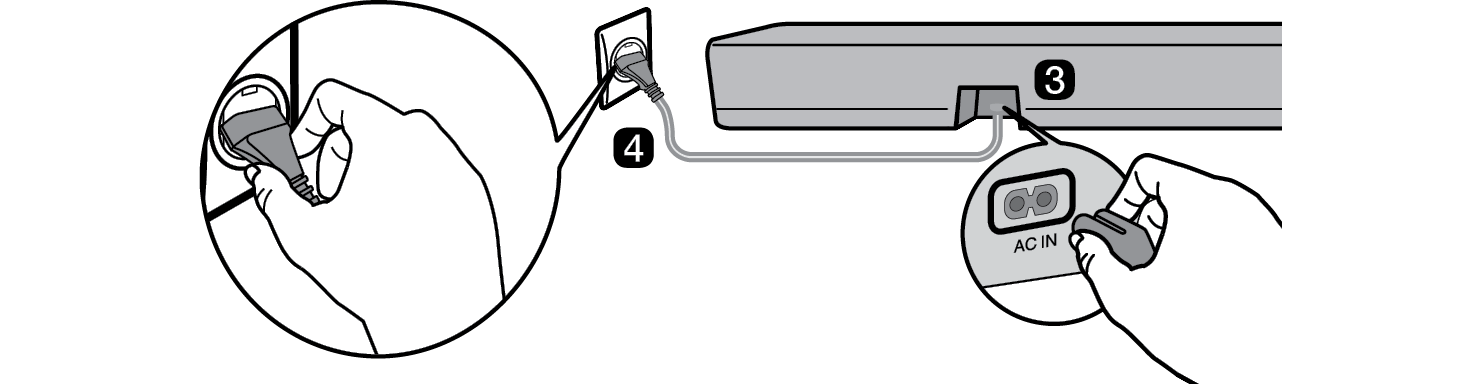

- f When the connection is automatically established, you will see the LED on the wireless subwoofer light up in green.
Checking the connection with the LED on the wireless subwoofer
You can check the connection status by looking at the LED on the wireless subwoofer.
|
LED Color |
Status |
|
Blinking green |
Connecting in progress |
|
Green |
Connected successfully |
|
Red |
Bad connection, or the subwoofer is in standby |
|
Off |
Power cable not connected |
Connecting the wireless subwoofer manually
If you see a red LED on the wireless subwoofer, it means that the soundbar is not connected to the subwoofer. If this is the case, connect them in the following order.
-
a Press the Power
 button on the soundbar to turn it off.
 - b Press the PAIRING button on the back of the wireless subwoofer. Check if the LED on the subwoofer is blinking green. If you still see a red LED on the wireless subwoofer, press and hold the button on the back of the subwoofer again.


-
c Press the Power
 button on the soundbar to turn it on.
 - d When the connection is established, you will see the LED light on the wireless subwoofer light up in green.
|
|
|
|
|



Setting up surround sound
The surround sound function allows you to hear immersive 3D sound produced by multiple audio channels from the speakers, regardless of the channels in the originally recorded content.
For example, if you listen to music recorded in 2.0 channels with standard sound effects, you can hear the following difference.

When the surround sound is off

When the surround sound is on

|
|
|
|
|


-
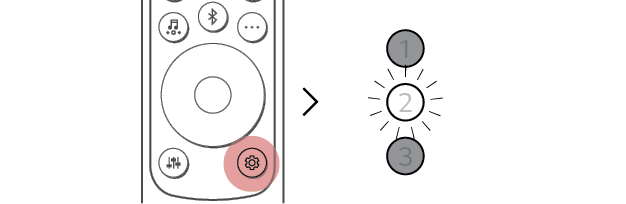
a Press Settings
 button. LED2 blinks white.

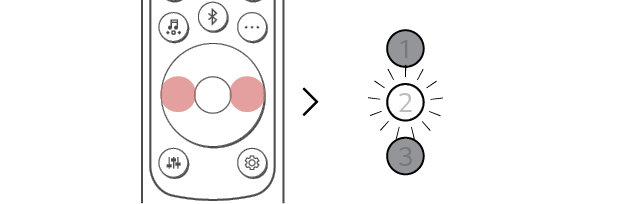
- b While the LED2 is blinking, press Left/Right button to choose the surround sound setting.

- c While the LED2 is blinking, press Up/Down button. If the surround sound setting is on, LED1 blinks white. If the surround setting is off, LED3 blinks white.
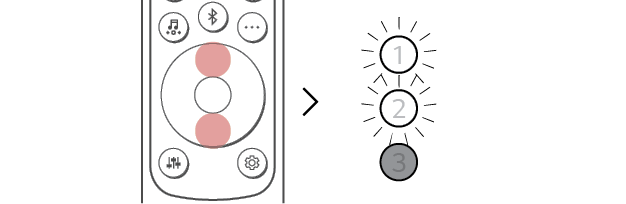
(On)
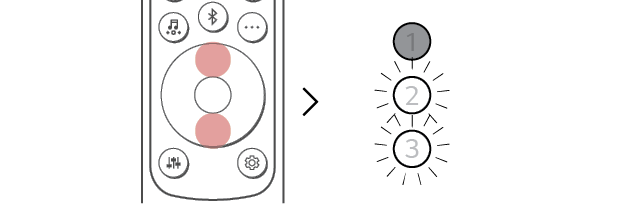
(Off)

Speaker sound based on input channels
|
Sound Effects |
|
|
Input |
Output |
|
AI SOUND PRO Sound customized with artificial intelligence |
|
|
2.0 channels |
|
|
5.1 channels |
|
|
STANDARD You can enjoy optimized sound |
|
|
2.0 channels |
|
|
5.1 channels |
|
|
MUSIC You can enjoy better sound optimized for music |
|
|
2.0 channels |
|
|
5.1 channels |
|
|
CINEMA Cinematic 3D sound |
|
|
2.0 channels |
|
|
5.1 channels |
|
|
CLEAR VOICE PRO Improves the clarity of voices |
|
|
2.0 channels |
|
|
5.1 channels |
|
|
SPORTS Realistic sound like in a stadium |
|
|
2.0 channels |
|
|
5.1 channels |
|
|
GAME Optimized sound for game |
|
|
2.0 channels |
|
|
5.1 channels |
|
|
BASS BLAST (BASS BLAST+) Sound with reinforced bass |
|
|
2.0 channels |
|
|
5.1 channels |
|









Exploring the Product