|
a
|
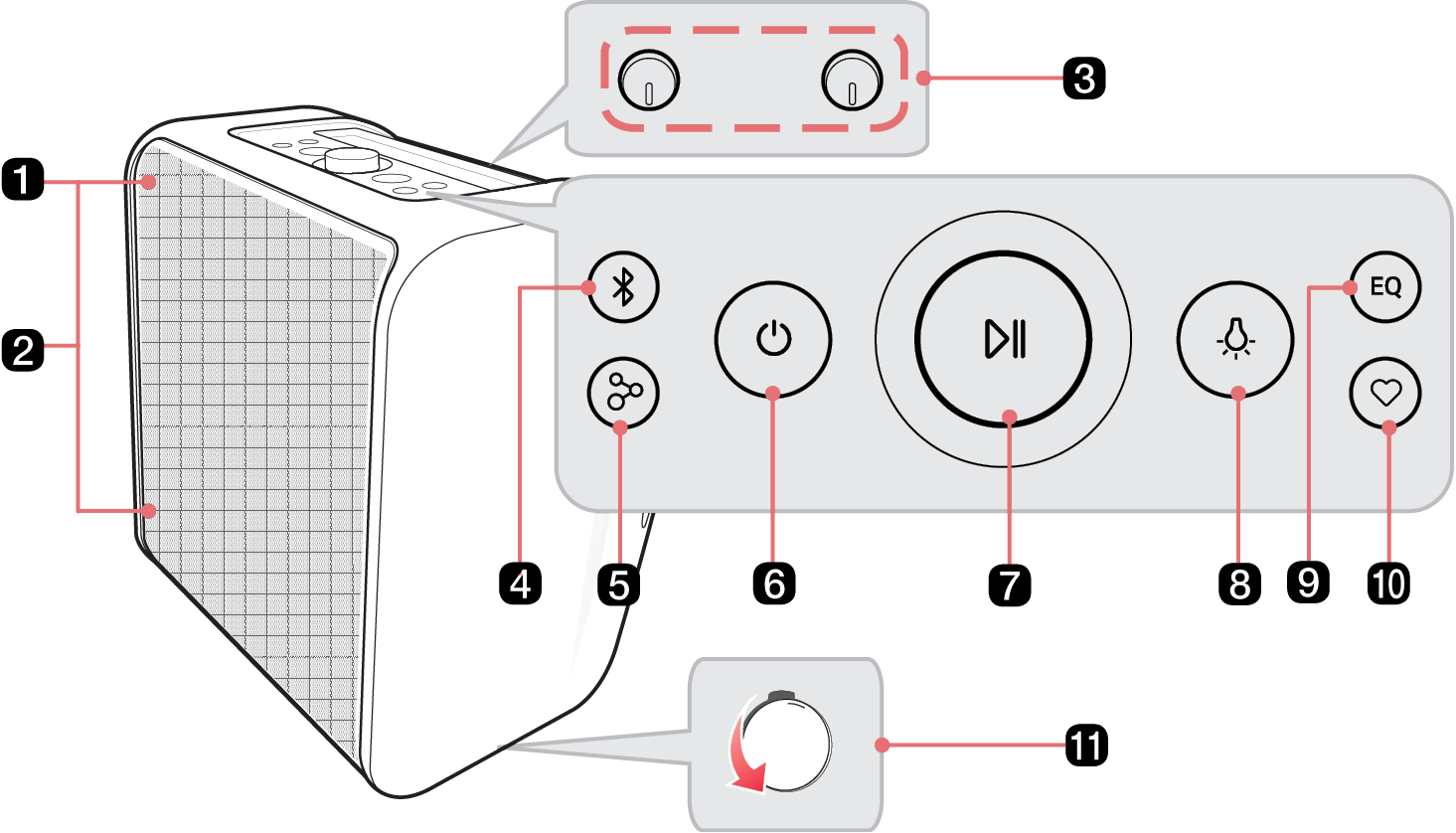
Lighting Indicator
|
|
b
|
Mood Lighting 
Press the button repeatedly to select the desired Mood Lighting.
- • You can customise the Mood Lighting mode as you want by connecting to the LG ThinQ app.
- • If you press the Mood Lighting
 button on the product repeatedly, turn the Mood Lighting off. button on the product repeatedly, turn the Mood Lighting off.
|
|
c
|
- MIC / GUITAR + volume knob
Turns the knob to the right (+) or left (-) to adjust the Microphone and Guitar sound volume.
- REVERB + knob
Turns the knob to the right (+) or left (-) to adjust the REVERB.
|
|
d
|
Bluetooth 
You can change the Bluetooth settings.
|
|
e
|
Party Link 
- • Stereo mode: Press the button twice quickly. ([ See “Stereo mode” on page 19.)
- - Only the same models can be connected.
- • Multi mode: Press the button. ([ See “Multi mode” on page 20.)
- - Party Link is only available among Auracast™-supported models from LG.
|
|
f
|
Power 
Turns the speaker on or off.
|
|
g
|
Play/Pause  / Volume knob / Volume knob
- • Play/Pause: Press the button.
- • Moving to the next music: Press the button twice quickly.
- • Moving to the previous music: Press the button three times quickly.
Turns clockwise or counterclockwise to adjust the volume level.
|
|
h
|
Mood Lighting 
Press the button to select the desired Mood Lighting.
- • You can customise the Mood Lighting mode as you want by connecting to the LG ThinQ app.
- • If you press the Mood Lighting
 button on the product repeatedly, turn the Mood Lighting off. button on the product repeatedly, turn the Mood Lighting off.
|
|
i
|
EQ
Changes sound effect. ([ See “Setting Sound Effects” on page 29.)
|
|
j
|
MY 
- • Press the button to use the MY functions. ([ See “Using MY function” on page 24). Before using MY functions, set up in the LG ThinQ app.
- • Press the button twice to use Space Calibration. It selects the optimal sound settings to suit your content.
|
|
k
|
Tripod hole cup
|