Sound Bar Quick Guide
Connecting the Earbuds to a Smartphone via Bluetooth
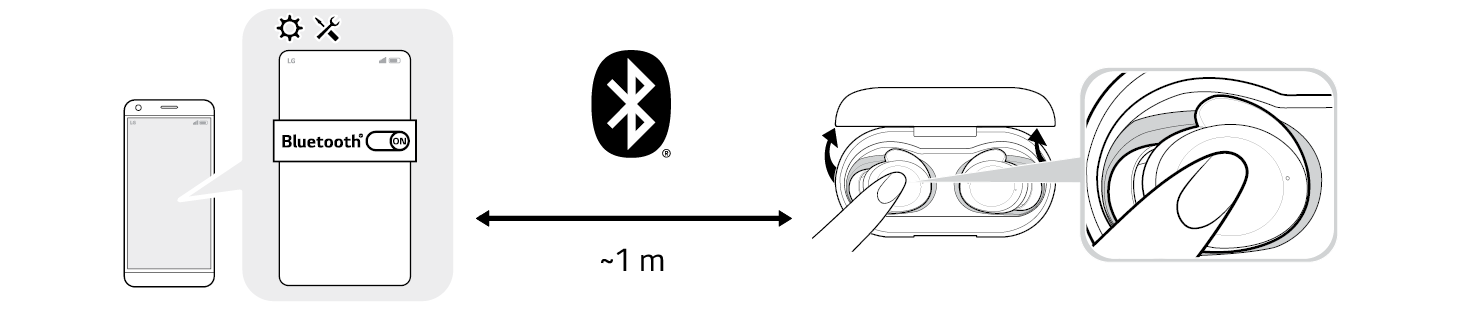
- a Turn on the Bluetooth® function of your smartphone or a device you want to connect.
- b Open the cover with earbuds attached to the charging case. The blue battery status indicator on the front blinks. If the blue battery status indicator does not blink, or if you want to connect a device other than the one already connected, touch and hold the touch pad of the left or right earbud for 3 - 5 seconds.

- c When the Fast Pair connection pop-up appears at the bottom of the smartphone screen, touch the pop-up to connect.
- Only Android™ 6.0 or higher is supported, and Bluetooth® and location information settings of the mobile device are required.
- d If the connection pop-up does not show up, select and connect [xboom Buds] in the Bluetooth® menu of the smartphone. (For users of iOS or Android 5.0 or lower)
- If the earbuds model name is displayed abnormally on the Android device, please change the model name in the Bluetooth® menu of the settings of the connected device.
- The model name is BUDS, but when connected via Bluetooth, it is displayed as the representative model name xboom Buds on smartphones and apps.
|
|
|
|
|

