Sound Bar Quick Guide
Top
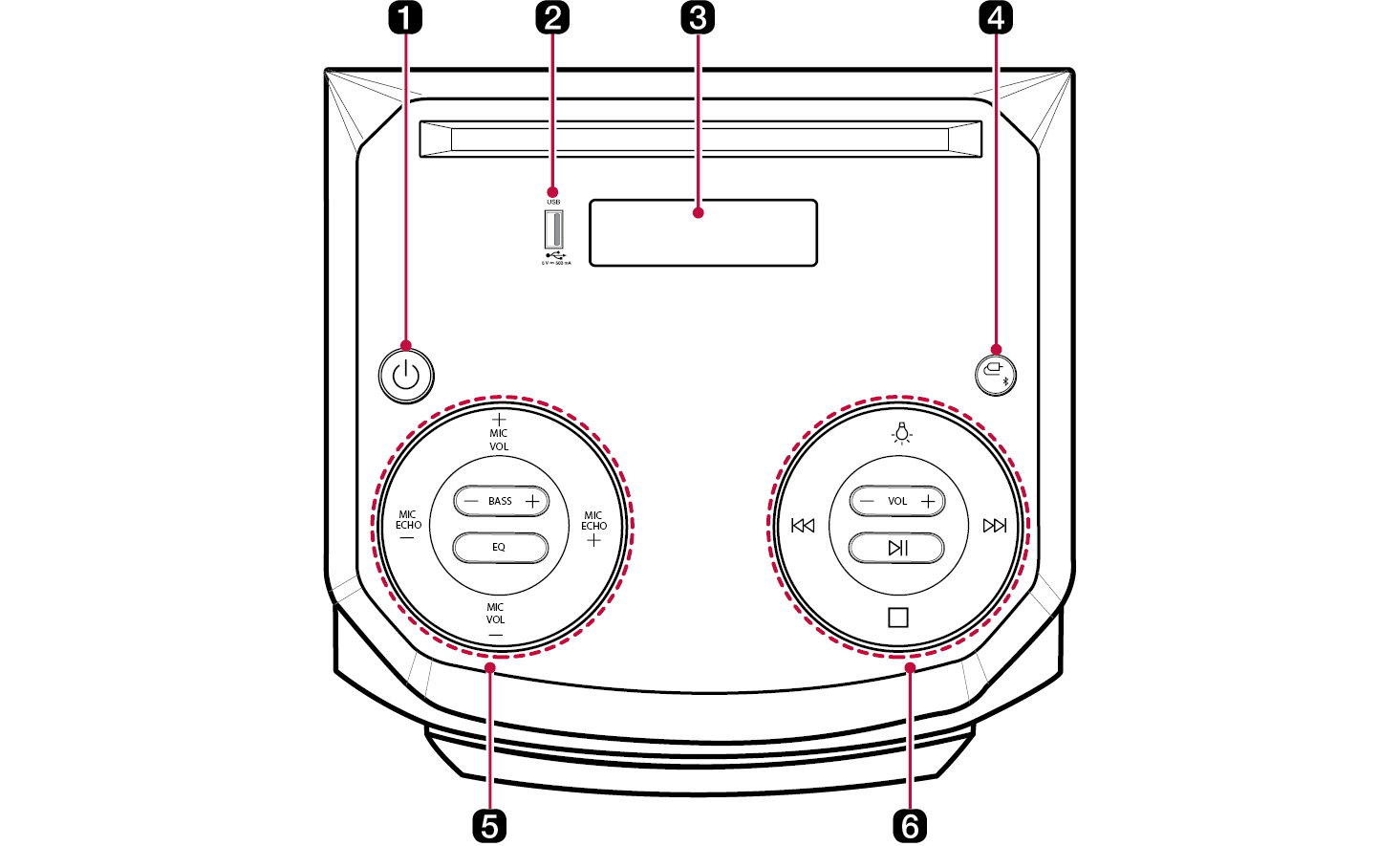
|
a |
Power
It turns on/off the product. |
|
b |
USB port Plug in a USB storage device to enjoy music with the product. |
|
c |
Status display Options such as input mode and volume are displayed in text. |
|
d |
Function
Press the button repeatedly to select the desired input mode or function.
|
|
e |
MIC VOL (Microphone Volume)
When you connect your microphone to the MIC jack, you can adjust an microphone volume. Range: 0(MIN) to 15(MAX)
MIC ECHO (Microphone Echo)
When you connect your microphone to the MIC jack, you can adjust an echo effect to the sound from the microphones. Range: 0(MIN) to 9(MAX)
BASS
You can adjust the bass sound level as your preference. Adjust the bass sound level. Range: -5(MIN) to +5(MAX) EQ Chooses sound impressions. |
|
f |
Lighting
Press the button repeatedly to select the desired Woofer lighting. You can customise the Woofer Lighting mode as you want by pressing the button repeatedly.
Skip/ Search
Stop
Stops playback.
VOL (Volume)
It controls the volume level. Range: 0(MIN) to 40(MAX)
Play/Pause
Starts or pauses playback. |


|
|
|
> CAUTION |
|
