Sound Bar Quick Guide
Connecting and Using the Speaker
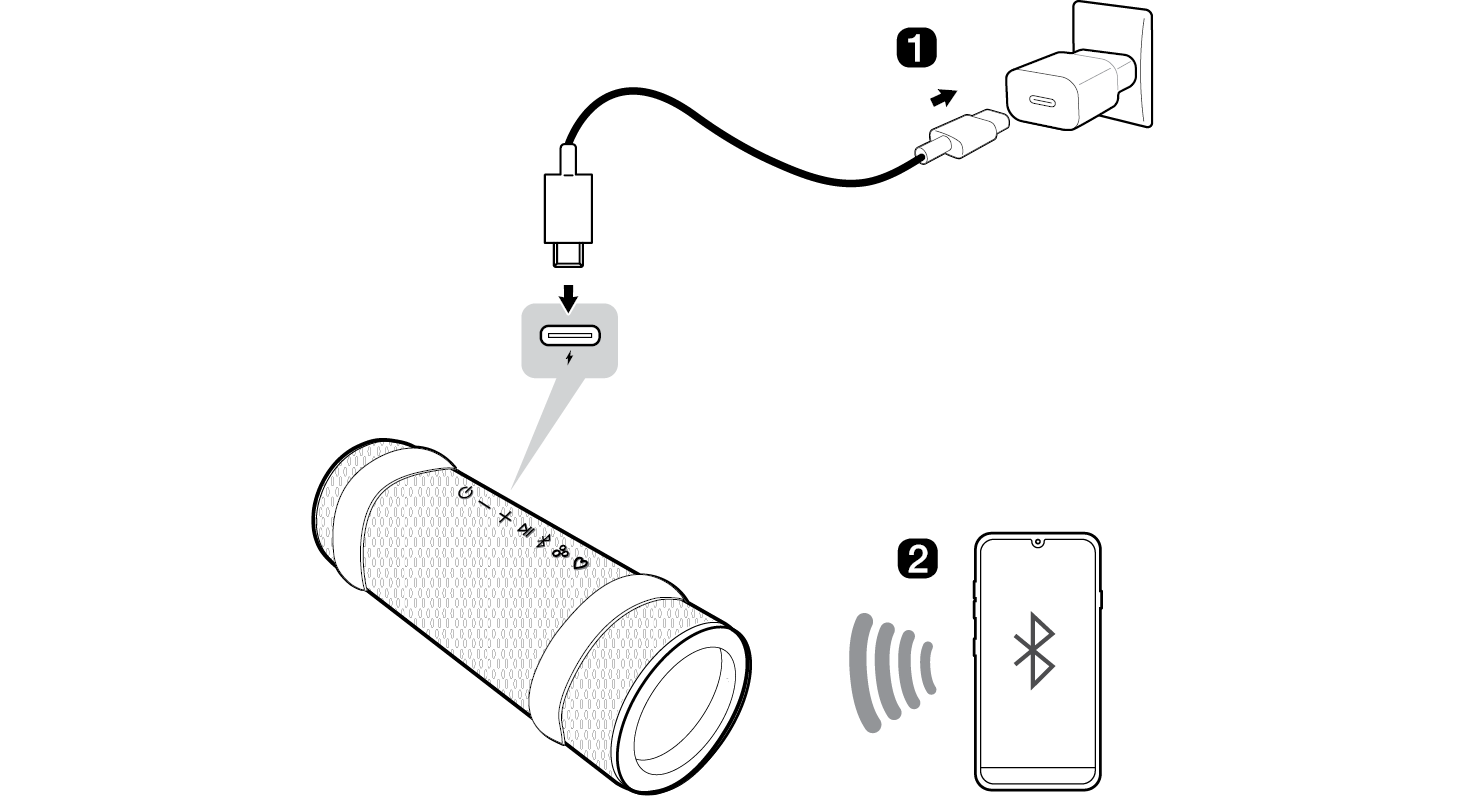

- a Charge the speaker before using it and connect the speaker to an AC adapter (not supplied).
- b Connect the speaker to a smartphone via Bluetooth ([ See “Connecting Smartphone to the Speaker via Bluetooth” on page 14.)
-
A Press the Power
 button on the speaker to turn it on. The lighting Indicator blinks.
 -
B Press the Settings
 button on the smartphone and select Bluetooth. Turn on the Bluetooth function. (Off
 > On
> On )
) - C Find “xboom Grab” on the device list on the smartphone and connect to it. Once the smartphone is connected via Bluetooth, the lighting Indicator will turn on.
- D On the smartphone, play a music of your choice.
- c Connecting the LG ThinQ app ([ See “Installing app” on page 20.)
- A Find the LG ThinQ app on the Google Play or App Store and install it on your smartphone.
- B Run the LG ThinQ app and use more features. (EQ, Party Link, Lighting, Sleep Timer, Setting etc.)
Table of Contents
Portable Bluetooth Speaker Quick Guide
2 Connecting and Using the Speaker
Exploring the Product
5 Top
7 Back
8 Carrying the unit
Charge
9 Charging the Battery
11 Checking Battery Status
Connecting to Bluetooth
14 Connecting Smartphone to the Speaker via Bluetooth
17 Connecting Two Bluetooth Devices to the Speaker
18 Talking on the Phone Hands-free
19 Using Voice command
Connecting to the LG ThinQ app
20 Installing app
21 Using MY function
22 Using the Party Link
26 Listening Auracast™ broadcast
Additional Functions
27 Force the Speaker power off
27 Initializing the speaker
28 Using Auto Power Management
29 Using Power On via Bluetooth
29 Voice feedback function
Safety Precautions
30 Safety and Regulatory
33 Prevention of product misuse
Before Reporting Product Malfunction
37 Troubleshooting
Appendix
38 Specifications
39 Registered Trademarks and Licenses
40 Handling the Product
Exploring the Product