Front
|
a |
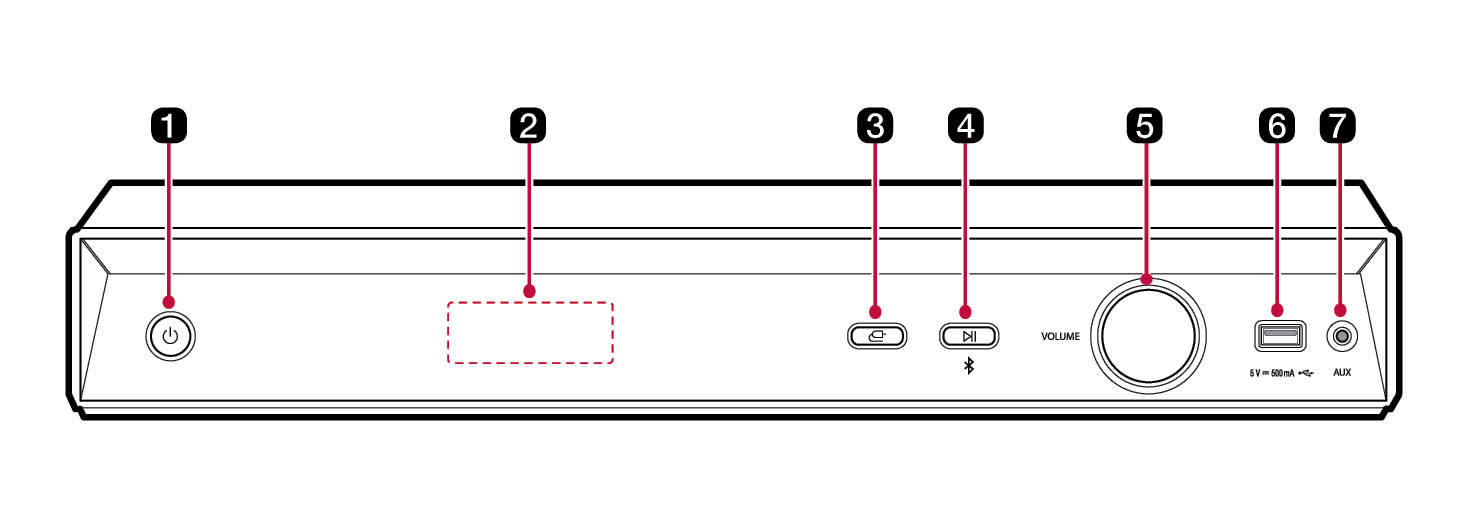
Power This turns the product on/off. |
|
b |
Status display Options such as input mode and volume are displayed in text.
Remote Control Receiver
|
|
c |
Function Press the button repeatedly to select the desired function or input mode.
|
|
d |
Play/Pause Starts or pauses playback. Press the button to select Mono/ Stereo in FM mode. Bluetooth pair Press and hold the button for 3 seconds or longer. It allows you to pair your Bluetooth device such as a smartphone to this product for three minutes. ([ See “Connecting via Bluetooth” on page 42.) |
|
e |
VOLUME (Volume knob) Turns the knob to the right or left repeatedly to adjusts the speaker volume with levels 0 to 100. |
|
f |
USB port Plug in a USB storage device to play music with the product. |
|
g |
AUX Connects a portable device (MP3 player, etc) to AUX connector. |


|
|
|
|
|
If there is no playback or button input for 15 minutes, the product turns off automatically(Except FM mode). |

