Exploring the Product

Sound Bar Quick Guide

Exploring Remote Control

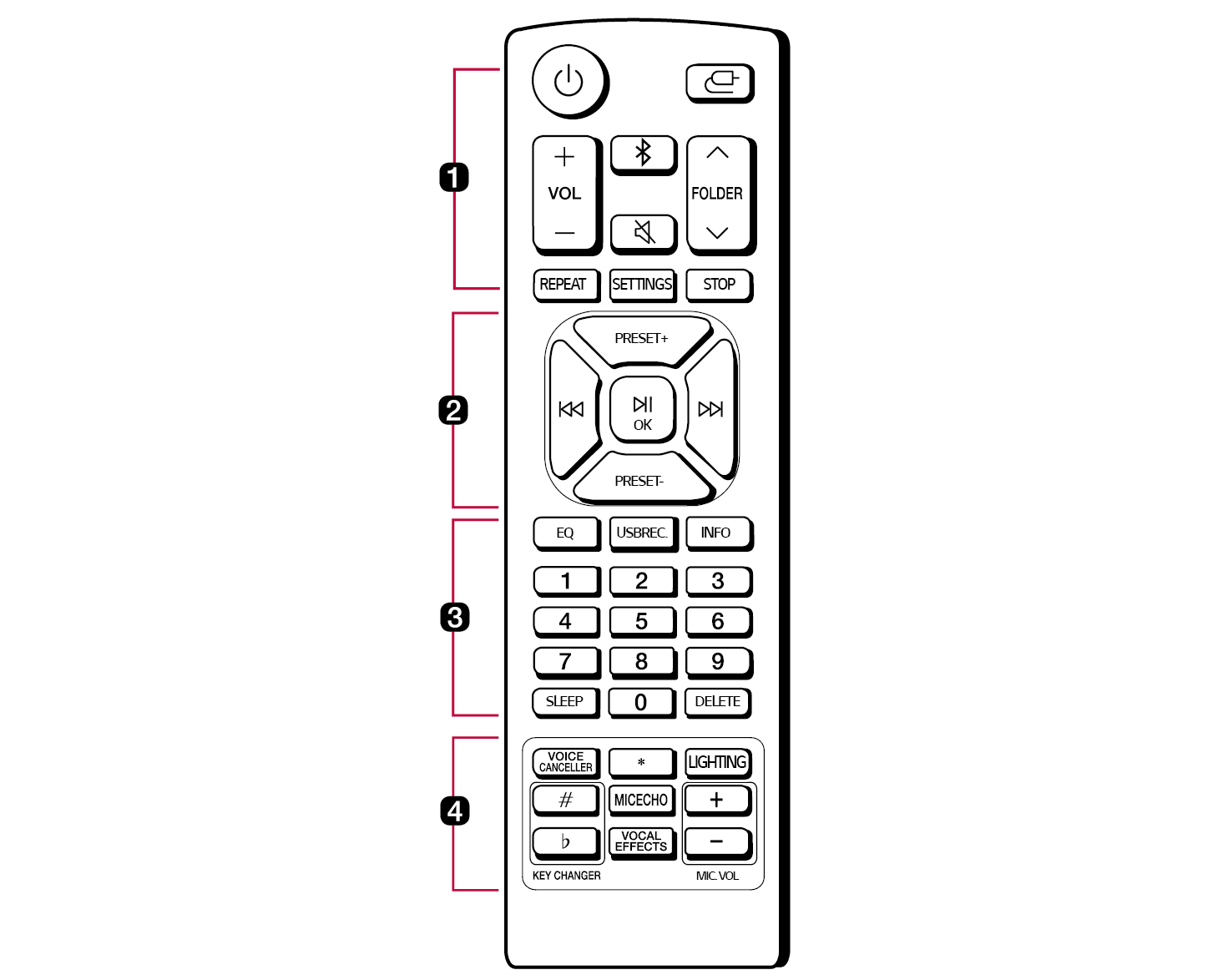
You can use the remote to control all functions of the product, from turning the power on/off to enabling cinematic sound.
144317.png

Replacement of Battery

134625.png

Use AAA 1.5V batteries. Replace the two batteries by inserting them into the remote control in accordance with the directions indicated.

  1. A Open the battery cover on the back of the remote control.
  2. B Insert the batteries with the + and – ends corresponding to the markings.
  3. C Close the battery cover.

Risk of fire or explosion if the battery is replaced by an incorrect type.

a

Power 152346.png

Turns the product on/off.

Function 152352.png

Press the button repeatedly to select the desired input mode or function.

  • OPT/HDMI ARC: Connects the product to a TV that supports an optical cable, ARC or LG Sound Sync.
  • BT: Connects the product via Bluetooth.
  • FM: You can listen to FM radio.
  • USB: Connects the product to a USB storage device.
  • AUX: Connects a portable device (MP3 player, etc).
  • HDMI1/2/3: Connects the product to an HDMI input port.

VOL (Volume) 152365.png152359.png

Adjusts the sound volume.

Bluetooth pair 134696.png

It allows you to pair your Bluetooth device such as a smartphone to this product for three minutes. ([ See “Connecting via Bluetooth on page 42.)

Mute 152396.png

Mutes the sound. To cancel it, press 152408.png on the remote control again or change the volume level.

FOLDER 136769.png136761.png

Selects the USB folder.

REPEAT

In USB mode, listens to your files repeatedly or randomly.

In USB mode, press the button on the remote control repeatedly. Repeat/shuffle playback operates as follows.

  • ONE: Plays a same song repeatedly.
  • FOLDER: Plays songs in a folder repeatedly.
  • ALL: Plays all the songs repeatedly.
  • SHUFFLE: Plays all the songs once randomly, and stops the playback.
  • OFF: Plays songs in order and stops the playback.

SETTINGS

Displays or exits the SETTINGS menu. ([ See “Settings and adjustments using the SETTINGS menu on page 35.)

STOP

  • Stops playback.
  • The product records the point where you pressed. If you press twice, the speaker will clear the stopped point.
  • Cancels DELETE function.

b

Skip/Search 137154.png137160.png

  • Moving to the next music: Press the 142440.png button once.
  • Moving to the previous music: Press the 142446.png button twice quickly.
  • While playing a file on a USB storage device, press and hold the Skip/Search137177.png137170.png button. The search begins. At this time, if you release your hand from the desired part, it will play from that part.
  • Tunes in the desired radio station.
  • Selects an option in the SETTINGS menu. ([ See “Settings and adjustments using the SETTINGS menu on page 35.)

PRESET 152418.png152413.png

OK (Play/Pause) 134775.png

  • Starts or pauses playback.
  • Press the button to preset the radio stations in FM mode.
  • Press and hold the button to select Mono/ Stereo in FM mode.
  • Confirms the setting.

c

EQ

Press the button to select the desired sound field.

  • AI SOUND PRO: Artificial intelligence selects the optimal sound settings to suit your content.
  • CLEAR VOICE: Voice sound clear, improving the quality of voice sound.
  • STANDARD: You can enjoy optimised sound.
  • BASS BLAST (BASS BLAST+): Bass sounds are enhanced.
  • FOOTBALL: Realistic sound like in a stadium.
  • CINEMA: Play content with 3D sound similar to a movie theater.
  • GAME: Optimised sound for game.
  • MUSIC: You can enjoy better sound optimised for music.

USBREC. (Recording)

USB direct recording. ([ See “Recording to USB on page 48.)

INFO

View the connected input source or Bluetooth information.

  • BT: Connected Bluetooth device name.
  • OPT/ARC/HDMI1/HDMI2/HDMI3: Current sound source.
  • USB: Current sound file name.
  • USB Recording: Current recording progress time.

0 to 9 numerical buttons

Selects numbered files or preset number.

SLEEP

Sets dimmer or the system to turn off automatically at a specified time.

  • Press the button repeatedly to select delay time between 10 and 180 minutes. After the delay time, the unit will be turned off. To cancel the sleep function, press the button repeatedly until “OFF” appears.
  • You can check the remaining time before the unit is turned off. Press the button to check or change the remaining time.

DELETE

d

VOICE CANCELLER

You can reduce the vocal tones during music playback in USB and Bluetooth mode.

*

This button is not available.

LIGHTING

Turns the lighting on or off on the front of the receiver.

KEY CHANGER

Changes the key to suit your vocal range in USB and Bluetooth mode.

MICECHO

Press the button to select the desired ECHO mode when the microphone is connected.

VOCAL EFFECTS

Selects various vocal effects mode.

MIC. VOL (Volume)

This adjusts the microphone sound volume with levels 0 to 15.

148339.png

148333.png Note

  • Do not look directly at the light emitting part when the LIGHTING is turned on.

How to deactivate the wireless network connection(s).

Press and hold the Power152423.png button for 3 seconds or longer to turn off the product.

Connecting to the TV